


Chessis: Chess Analysis 21.5
Google Commerce Ltd
November 21, 2026
10.1 MB
21.5
com.chessimprovement.chessis
RELATED APPS






SCREENSHOTS


DESCRIPTION
Do you want to turn your chess games into personal lessons with Chessis: Chess Analysis APK?
Chessis: Chess Analysis offers a detailed look at every move you make on the board. Developed by Google Commerce Ltd, this application acts as a digital coach by using the powerful Stockfish 19 engine to evaluate your performance. Whether you are a beginner or an experienced player, the app provides feedback to help you understand your mistakes. With over 1,000,000 users, it is a popular choice for those looking to improve their tactical skills. By downloading the Chessis: Chess Analysis APK, you gain access to a tool that turns every match into a learning opportunity.
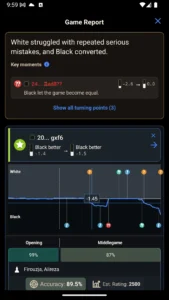
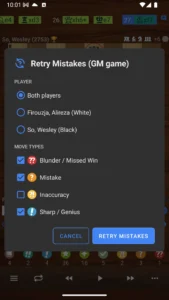
The app provides a full game report that includes your accuracy, an estimated rating, and a breakdown of your play phase-by-phase. You can identify turning points in your matches through key moments explained in plain words. The move badges, ranging from Brilliant to Blunder, help you visualize your game progress. A unique feature allows you to retry mistakes, letting you replay critical moments to find better moves. You can also explore Poker Heat™ Texas Holdem Poker if you look for competitive strategy in other formats.
How does the analysis process work in Chessis: Chess Analysis APK?
You can analyze games from major platforms like Chess.com and Lichess, or import your own PGN files. The app even allows you to scan a board with your camera. During play, you can face human-like bots that offer different styles, such as aggressive or defensive. These bots provide hints and move-strength feedback, and you can even practice famous opening traps to improve your repertoire. For those interested in a different pace of play, Pusoy Dos ZingPlay – card game provides another card-based experience.
The app requires several permissions to function, including internet access for cloud features and Bluetooth for connecting to electronic boards. It also uses your network state and wake lock to ensure a stable connection during analysis. You will need to grant notification permissions to stay updated on your game stats and progress. The installation process is simple, and the app is designed to perform well on your mobile device. Because it supports Google Drive backup, your progress is kept safe across different sessions.
Detailed Engine Performance and Tools
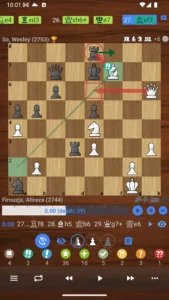
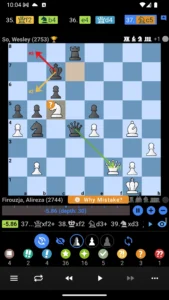
The core of the experience is the inclusion of Stockfish 19, which is widely considered the strongest chess engine in the world. You can view multiple engine lines, use threat arrows, and benefit from advanced blunder detection. The board editor provides a live evaluation bar, while the games database allows for FEN search and annotated PGN export. Chess960 support is also included for those who enjoy non-standard starting positions. You can even watch engines battle against each other to learn new tactical patterns.
Strengths and Limitations
Strengths:
- Access to the powerful Stockfish 19 engine for deep evaluation.
- Detailed post-game reports with specific blunder explanations.
- Support for PGN files and camera board scanning for physical games.
- Integration with Chessnut electronic boards.
- Ability to add multiple usernames for automatic PGN flipping.
Limitations:
- The free version displays advertisements.
- Advanced features like deep analysis and unlimited engine lines require a Pro subscription.
- Requires various permissions for full functionality, including Bluetooth, network state, and ad services.
Is Chessis: Chess Analysis free?
Yes, most features are free to use. However, the app offers a Pro tier that removes ads and unlocks deep analysis, unlimited engine lines, and mistake alerts.
Does it work offline?
While some features like cloud backup and importing games from online platforms require a connection, the core analysis tools and engine functionality are available for your use.
Can I use it with my own chess board?
Yes, Chessis: Chess Analysis includes support for Chessnut electronic boards, allowing you to bridge your physical play with digital analysis.
