Signal Detector 1.20.18
Lefan Co., Ltd.
November 16, 2026
Varies with device
1.20.18
ANDROID
RELATED APPS






SCREENSHOTS
DESCRIPTION
What Is Signal Detector?
Signal Detector is a comprehensive diagnostic utility designed to pull back the curtain on the invisible signals surrounding your Android device. Rather than relying on generic OS indicators, this app provides granular, real-time data for cellular networks, Wi-Fi, Bluetooth, GPS, and environmental sensors. It serves as a Swiss Army knife for users who need to troubleshoot connectivity issues, optimize signal reception, or monitor hardware health through professional-grade metrics.
Key Features
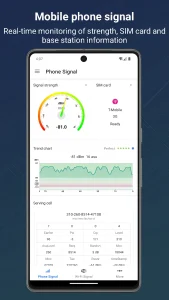
- Cellular Analysis: Detailed monitoring for 5G, LTE, and WCDMA networks, including neighbor cell lists and base station distance estimations.
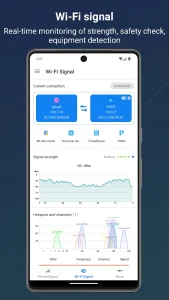
- Wi-Fi Security: Scans for DNS hijacking, ARP spoofing, and SSL anomalies while providing channel and bandwidth metrics.
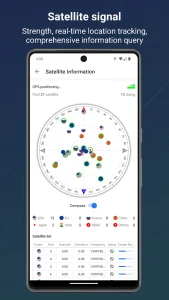
- GPS & Satellite Tracking: Visualizes satellite positions across multiple constellations like BeiDou, GLONASS, and Galileo with 3D accuracy data.
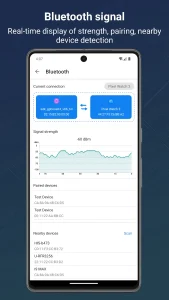
- Bluetooth Finder: Helps locate misplaced peripherals like headphones or smartwatches using signal strength proximity.
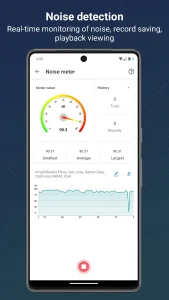
- Sensor Suite: Accesses internal hardware sensors to measure magnetic fields, noise decibels, ambient light, and air pressure.
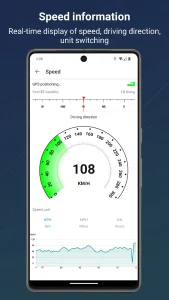
- Hardware Monitoring: Keeps tabs on CPU frequency, battery health, and real-time power consumption metrics.
Hands-On Usability & Performance
When you first launch Signal Detector, the interface presents a dashboard-style layout that avoids clutter despite the sheer volume of data. Navigating between the network, sensor, and hardware tabs feels responsive, and the dynamic charts update with minimal latency. For users struggling with dead zones in basements or elevators, the cellular signal trend curve is particularly useful for identifying exactly where coverage drops off.
On the battery front, the app provides more than just a percentage. By monitoring voltage and current draw, it helps identify power-hungry background processes. The network diagnostic suite is another high point, offering PING, Traceroute, and speed test tools that feel more robust than standard web-based alternatives. While the app requests several permissions to function—such as location for GPS data and hardware access for sensor readings—these are necessary to generate the granular insights promised. Battery drain during active use is within acceptable limits for a monitoring tool, and it does not feel intrusive during daily operation.
Frequently Asked Questions
Does Signal Detector require root access?
No, the app functions fully on standard Android devices without needing root access, though some deep hardware metrics may vary depending on your specific phone manufacturer’s permission restrictions.
Can this app really help find lost Bluetooth devices?
Yes, by monitoring the signal strength (RSSI) of a paired device, you can walk around an area and observe the signal intensity increasing as you get closer to the object, effectively acting as a proximity tracker.