


Pedometer - Step Counter App 1.1.3
Litter Penguin
November 26, 2026
5.5 MB
1.1.3
tool.fitness.step.counter.pedometer
RELATED APPS





SCREENSHOTS

DESCRIPTION
Getting started with the Pedometer – Step Counter App APK
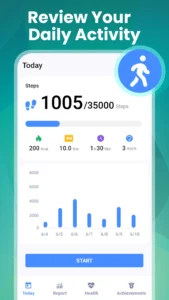
Starting your fitness journey with Pedometer – Step Counter App is easy because it requires no account registration. Once you install the Pedometer – Step Counter App APK, it uses your device’s built-in sensors to monitor your movement automatically. Because it does not rely on GPS, it saves battery power while keeping your data private. You can simply tap the start button to begin tracking your steps, distance, and calories burned throughout the day. The app remains active even when your phone is in your pocket, bag, or armband.
The app needs several permissions to function properly. It requires access to your physical activity to count your steps, as well as location permissions, which are often used by the underlying system services for sensor access. It also uses foreground services and wake locks to ensure the counter continues running even when your phone screen is locked. You can find more useful tools on our apk site for your daily needs. The developer ensures that the app is 100% private since no sign-in is required to access the main features.
Core features for your fitness goals
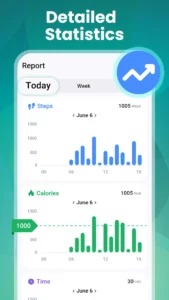
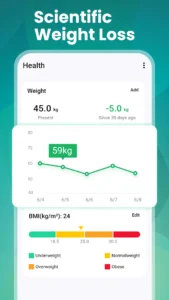
Pedometer – Step Counter App provides a clear view of your daily movement. You can monitor your walking distance and duration in real time. The app also calculates your calorie consumption, which helps if you are working toward weight loss or weight management goals. All this data is presented in intuitive graphs that let you review your progress by day, week, or month. The health tracker records metrics like your BMI and weight trends to provide a complete picture of your progress.
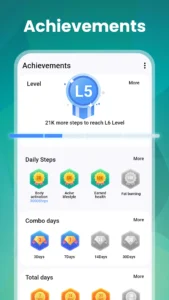
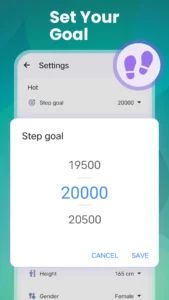
You may also want to try Health Connect to manage your fitness data across different platforms. For those who need to relax after a long walk, White Noise Audio Sleep Sound provides ambient tracks to help you rest. The Pedometer – Step Counter App allows you to set personalized daily step goals, such as hitting 10,000 steps, and displays streak statistics to keep you motivated. By reaching your daily goals consistently, you can build healthy habits over time. It is a comprehensive tool designed to encourage you to stay active and maintain your fitness.
Quick facts
Strengths and limitations
Strengths:
- No sign-in required for immediate use.
- Saves battery by using built-in sensors instead of GPS.
- Works in the background while the phone is in your pocket or bag.
- Visual graphs make it easy to check your health trends.
- Supports offline mode for continuous tracking.
- Full support for modern Android 13 systems.
Limitations:
- The app is supported by advertisements.
- Requires several permissions to run in the background.
Who should use this app?
This application is ideal for anyone looking for a free tool to monitor their daily activity without complex setups or wearable devices. If you want a lightweight tracker that works offline and keeps your data local, this is a great choice. Users who prefer to avoid constant GPS tracking will appreciate its power-saving design and simple interface. It is perfect for those who want to lose weight or simply keep track of their daily walking routine.
Frequently Asked Questions
Is the Pedometer – Step Counter App free?
Yes, the app is 100% free to use, though it is supported by advertisements.
Does it require an internet connection?
No, the app supports offline mode and can track your steps without an active internet connection.
Do I need a wearable device to use this?
No, this app uses your smartphone’s built-in sensors, so no additional hardware is required.
Which Android version is supported?
The app has been optimized for performance and includes support for the Android 13 system.
