


Health Connect 2026.10.01.00.release
Google LLC
November 22, 2026
7.5 MB
2026.10.01.00.release
com.google.android.apps.healthdata
RELATED APPS






SCREENSHOTS
DESCRIPTION
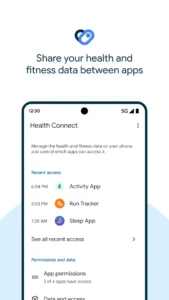
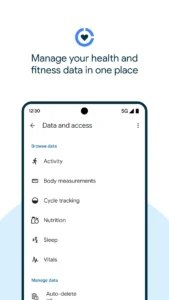
Managing health and fitness data often feels fragmented when you use multiple apps for activity, sleep, and nutrition. You might find it difficult to track your progress because your information is scattered across different platforms. The Health Connect APK provides a solution by acting as a central hub for your health information, created by Google Commerce Ltd. It allows your various fitness apps to communicate and share data securely while keeping you in full control of your privacy. By centralizing your metrics, you gain a clearer picture of your overall wellness without the need to switch between dozens of individual dashboards.
Understanding Health Connect APK Functionality
This tool simplifies how you handle your personal wellness metrics. By using Health Connect, you can aggregate data from your preferred health and fitness applications in one location. This means you no longer have to manually input the same information into multiple trackers. The system stores all your data offline directly on your device, ensuring that your sensitive information remains under your local control rather than being constantly uploaded to external servers. Because the data is stored locally, you benefit from a faster experience that does not rely on constant cloud synchronization for basic operations.
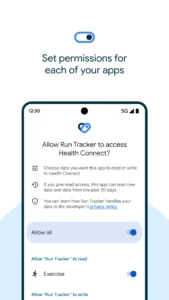
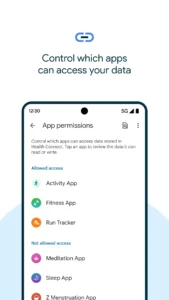
Privacy is a core focus of this application. Before any new app can access your information, the system requires you to review and approve the specific data types you wish to share. You can check which apps have accessed your details recently and revoke permissions at any time with a few taps. If you are looking for a different kind of engagement, you might enjoy Poker Heat™ Texas Holdem Poker for your leisure time, though it serves a different purpose than health management. This granular control ensures that you only share the metrics you are comfortable with, such as sleep patterns or step counts, while keeping other sensitive data private.
Getting started with the app is easy. After installation, you can access the interface through your device settings by navigating to Apps, then selecting the app, or by adding it to your Quick Settings menu. The app requires several permissions to function correctly, including Internet access for network state management, foreground services for background tasks, and notification permissions to keep you updated on your data sharing status. It also uses package usage statistics to maintain the connection between your health apps. For those interested in other card games, Pusoy Dos ZingPlay – card game is available for a completely different user experience.
The app relies on a variety of system permissions to operate effectively. These permissions include waking your device to perform background tasks, checking network states, and receiving boot completion signals to ensure the service is always ready when you need to sync your health metrics. By keeping these processes on-device, the application ensures that your sensitive metrics remain private while providing the connectivity required for your fitness ecosystem. This approach minimizes battery usage while ensuring your data remains accurate across all your connected devices and applications.
The Health Connect ecosystem is designed to grow with your needs. As you add more compatible apps, the central repository keeps your history intact. You can view your trends over time in your favorite apps without worrying about data silos. The developer, Google Commerce Ltd, regularly updates the platform to support new data types and improve compatibility across the Android ecosystem, making it a reliable choice for anyone serious about tracking their health statistics.
Strengths and Limitations
- Aggregates fitness data from multiple sources.
- Offers granular control over app-specific data permissions.
- Stores information offline on your device for improved privacy.
- Reduces the need to manually log data in multiple locations.
- Requires manual review of permissions for each connected app.
- Functionality depends on the compatibility of your other fitness apps.
- Limited standalone features as it acts primarily as a data bridge.
Frequently Asked Questions
Is Health Connect free to use?
Yes, this application is provided for free by the developer.
How do I access the app after installation?
You can find it in your device settings under Apps or by adding it to your Quick Settings menu.
Does the app store my data online?
No, Health Connect stores your fitness and health data locally on your device, keeping it offline.
Which Android version is required?
The developer does not specify a minimum Android version for this release.
