


Speech Recognition & Synthesis googletts.google-speech-apk_20261026.00_p0.1007071969
Google LLC
November 22, 2026
62.2 MB
googletts.google-speech-apk_20261026.00_p0.1007071969
com.google.android.tts
RELATED APPS






SCREENSHOTS
DESCRIPTION
Enhance Your Device with the Speech Recognition & Synthesis APK
Speech Recognition & Synthesis is a core utility developed by Google Commerce Ltd that enables your Android device to process audio in two directions. It acts as the backbone for both text-to-speech and speech-to-text features, allowing your phone to read text aloud or transcribe your spoken words into written format. By providing a unified engine, it ensures that your voice commands and screen readers function correctly across the entire operating system. When you download the Speech Recognition & Synthesis APK, you are installing a critical framework that powers modern communication and accessibility features on your mobile device.
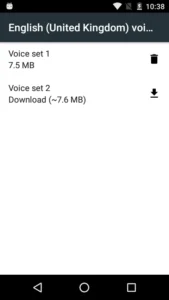
This engine is designed to work behind the scenes to support various system tasks. For example, it allows Google Maps to accept voice search queries, enables the Recorder app to transcribe audio on your device, and powers the Call Screen feature in your Phone app. You can also use it with accessibility tools like Voice Access to control your phone hands-free or rely on it for dictating text messages through your favorite keyboard applications. Because it is a system-level tool, it is often pre-installed, but updating the Speech Recognition & Synthesis APK ensures you have the latest performance improvements and language support.
If you want to manage your files while you explore system tools, you may want to try ZArchiver Pro Donate for advanced archive handling. For those who enjoy gaming on the go, the Minecraft Java: PojavLauncher is another utility that expands your device capabilities. Both tools complement the essential voice services provided by Google.
Key Functionalities and Usage
The app provides two primary modes of operation. The speech-to-text functionality converts your voice into written words, which is essential for language learning apps that recognize your pronunciation or search features that rely on spoken input. To enable this, you must go to your system Settings, navigate to Apps & notifications, select Default apps, and then set your Assist App to the Google engine. This process helps your device understand spoken queries more accurately across various third-party applications in the Play Store.
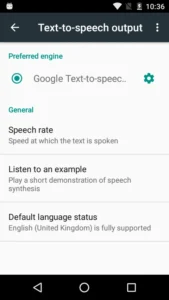
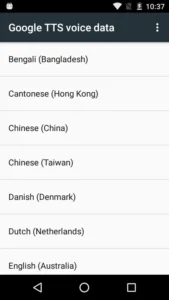
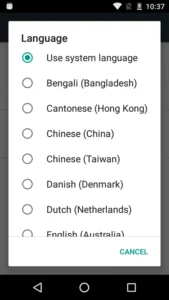
The text-to-speech functionality performs the reverse task by reading screen content aloud. This is vital for accessibility applications like Talkback, which provide spoken feedback for users with visual impairments. It also powers the Read Aloud feature in Google Play Books and helps you hear correct pronunciations in Google Translate. To configure this, visit your device Settings, select Languages & Input, and choose the text-to-speech output settings to set your preferred engine. These settings allow for a personalized experience, letting you adjust the voice, speed, and pitch of the synthesized audio.
System Integration and Requirements
The app is free to use and integrates directly into your Android environment. Because it requires significant system control to function across other apps, it requests permissions such as RECORD_AUDIO for voice input and various network states to download necessary language data. It is a highly reliable tool that serves over 10 billion installs, making it a standard requirement for almost all Android users. The Speech Recognition & Synthesis engine also utilizes foreground services to ensure that transcription tasks are not interrupted while you use other applications.
Strengths
- Essential for accessibility features like Talkback and screen reading.
- Supports real-time voice-to-text dictation across many system and third-party apps.
- Free to use with no hidden costs or subscriptions.
- Provides consistent voice input quality for language learning and search.
Limitations
- Requires several system permissions, including audio recording and network state access.
- Not a standalone app for users to open directly; it operates as a background service.
- Dependent on system-level configuration, which can be complex for some users.
Frequently Asked Questions
Is Speech Recognition & Synthesis free?
Yes, the app is free to download and use on your Android device.
Do I need an internet connection to use it?
The app requests INTERNET permissions, often to download specific language packs or updates, though many core functions work on-device.
Where do I change the speech settings?
You can manage speech-to-text settings under your device’s Default apps menu and text-to-speech settings under the Languages & Input menu.
