
Dice Merge! Puzzle Master 1.16.1.2633
MobilityWare
November 23, 2026
143.6 MB
1.16.1.2633
Android 8.0
com.mobilityware.DiceMerge
RELATED APPS




SCREENSHOTS
DESCRIPTION
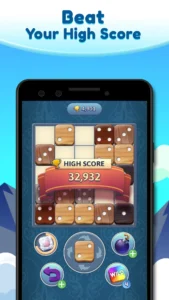
Looking for a relaxing block matching puzzle that lets you play at your own pace without timer pressure? Dice Merge! Puzzle Master is a board matching game developed by MobilityWare. If you decide to get the Dice Merge! Puzzle Master APK download for Android, you receive a strategic puzzle experience where you combine colored dice on a grid to score high points and build ruby gems.
Is Dice Merge! Puzzle Master APK the Right Block Matching Puzzle for You?
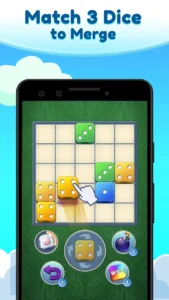
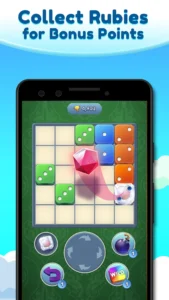
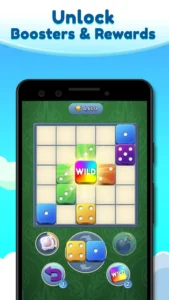
In this game, your main goal is to drag and drop dice blocks onto a board and line up matching numbers or colors. When you pair three dice of the same color, they merge into a single die with a higher value. Continuing this process allows you to form ruby gems, which grant bonus points and help clear board space.
MobilityWare designed the gameplay without any time limits, so you can think carefully about every placement. You can also rotate dice before putting them on the grid to maximize your matching opportunities. For those who like stylized board challenges like Wonderputt Forever, this title offers a similar focus on calculated moves.
How Does the Board and Dice Matching System Work?
The mechanics focus on color-coded values and customizable themes. Here are the primary features you will find in the game:
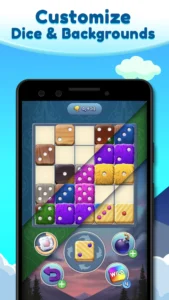
- Customizable Themes: Select different dice styles including wood, fuzzy, cookie, or bling patterns, and swap background designs to suit your taste.
- Strategic Rotation: Turn dice blocks in any direction before dropping them on the board to set up chain reactions.
- Display Options: Switch between traditional dice dots or numerical digits based on your visual preference.
- Daily Puzzles and Boosters: Complete daily challenges to earn bonus points and helpful boosters when the board gets crowded.
For fans of themed puzzle challenges and visual customization, such as the stage progression found in BLACKPINK THE GAME, you will appreciate the distinct dice skins and daily goals available here.
How to Install and Set Up on Android
To run the Dice Merge! Puzzle Master latest version on your device, download the file and follow standard installation steps. The app requires Android 8.0 or higher and 143.6 MB of storage space.
During installation and normal play, the game requests several Android system permissions:
- INTERNET and ACCESS_NETWORK_STATE: Connects to online servers for downloading daily puzzle content and retrieving advertisement data.
- POST_NOTIFICATIONS: Sends alerts regarding daily puzzle availability and special events.
- VIBRATE and WAKE_LOCK: Delivers haptic feedback when dice merge and keeps the screen active while you play.
- SCHEDULE_EXACT_ALARM: Sets timers for daily reminders and reward resets.
- BILLING: Processes optional in-app transactions for store items.
Quick Facts
Key Advantages and Limitations of Dice Merge!
Understanding the strengths and drawbacks helps you decide whether to install the game.
Strengths:
- No timer pressure allows for thoughtful strategic planning.
- Multiple dice designs and custom backgrounds personalize the board.
- Daily challenges provide fresh puzzle layouts every day.
Limitations:
- Contains ads as part of the free model.
- Requires 143.6 MB of free storage space.
Who Should Install It and Who Should Skip It?
You should install Dice Merge! Puzzle Master for Android if you like casual logic games that test spatial awareness without countdown clocks. It works well for players who want a relaxing brain exercise with customizable visual themes.
You may want to skip it if you prefer fast-paced action puzzles with real-time pressure or if you dislike games supported by advertising.
Frequently Asked Questions
Is Dice Merge! Puzzle Master APK free to play?
Yes, the game is free to download and play. It is supported by advertisements and includes optional billing features for in-app purchases.
Does the game force a time limit on moves?
No, there are no timers or time limits. You can take as long as you need to plan your moves and rotate dice blocks.
What Android version is required to install the game?
Your device must run Android 8.0 or higher to install and play the game.
Can I switch between dots and numbers on the dice?
Yes, the options menu allows you to choose between standard dice dots or numerical digits for the die faces.
APP TRAILER