

Audiomack: Music Downloader 8.11.4
Google Commerce Ltd
November 20, 2026
79.9 MB
8.11.4
com.audiomack
RELATED APPS






SCREENSHOTS
DESCRIPTION
How can you use Audiomack: Music Downloader APK for your music?
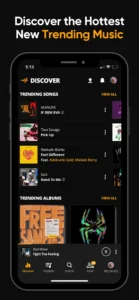
If you are looking for a way to access trending tracks and keep your favorite music available without a constant internet connection, Audiomack: Music Downloader APK is a primary choice. Developed by Google Commerce Ltd, this application allows you to stream unlimited full-length tracks and mixtapes directly on your Android device. It serves as both a streaming platform and a local file player, giving you total control over your personal library alongside the latest global hits in genres like Hip-Hop, R&B, and Afropop.
What features does the app offer for music fans?
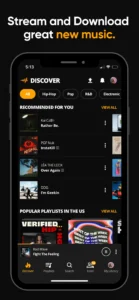
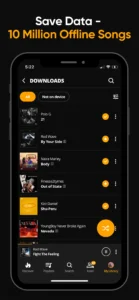
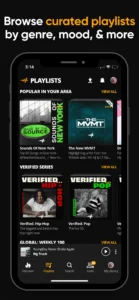
The app provides a wide range of tools for music discovery and playback. You can download full songs and albums for offline, data-free listening, which is extremely useful when you have limited mobile data or no Wi-Fi access. Audiomack: Music Downloader APK also includes a dedicated local file player that supports formats like MP3, M4A, AAC, and WAV. This means you can play your existing collection of music files alongside the vast streaming catalog provided by the service. You can browse music from top artists including 21 Savage, Youngboy, and Kevin Gates, and explore expertly curated playlists based on your specific mood or genre.
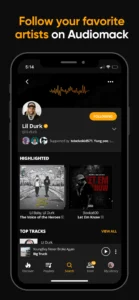
You can create unlimited playlists to organize your favorite songs by mood or genre. The app also features a Connect Tab, which allows you to follow your favorite artists and receive exclusive messages from them. For those who want more control over their listening environment, you might also find Meulify to be a useful companion for your audio needs. The platform supports cross-platform listening, including integration with Wear OS and Android Auto, ensuring your music stays with you wherever you go. You can even listen while using other apps, keeping your music playing in the background without interruptions.
If you are a power user who likes to customize sound levels for different applications, you could explore Sound Assistant to supplement your audio setup. While the app is free to use, there is an option to go ad-free for a monthly subscription fee of $6.99. This subscription removes advertisements and provides a more focused listening experience for dedicated fans of the platform. By following artists and producers, you stay updated on the newest releases, making it easier to be the first of your friends to discover what is trending next.
Getting started and permissions
To begin using Audiomack: Music Downloader APK, download the file and install it on your device. The app requires several permissions to function properly, including network state and internet access for streaming, as well as read access to your media files so it can play your local MP3s. It also utilizes biometric and fingerprint permissions for secure access and requires notification permissions to manage playback controls. You will also see permissions for foreground services, which allow the music to play smoothly while you use other apps. Other permissions cover device identification and data services to ensure the app functions across various hardware configurations.
Quick facts
Strengths and limitations
- Large library of trending Hip-Hop, R&B, and Afrobeats.
- Offline listening feature for data-free playback.
- Supports local music files and various audio formats.
- Integrated cross-platform support for cars and wearables.
- The free version of Audiomack: Music Downloader APK includes advertisements.
- Accessing ad-free listening requires a paid subscription.
- Requires multiple device permissions to operate all features.
Is the app free to use?
Yes, the app is free to download and use with advertisements. There is an optional subscription available for $6.99 per month to remove ads.
Can I listen to my own music files?
Yes, the app functions as a local file player that supports MP3, WAV, M4A, and AAC files stored on your device.
Does it work offline?
Yes, you can download songs and albums within the app to listen to them offline without using your mobile data or needing a Wi-Fi connection.
