


Free Download Manager - FDM 6.36.0.7132
SoftDeluxe, Inc.
November 22, 2026
57.9 MB
6.36.0.7132
Android 9
org.freedownloadmanager.fdm
RELATED APPS






SCREENSHOTS
DESCRIPTION
Efficient File Management with Free Download Manager – FDM APK
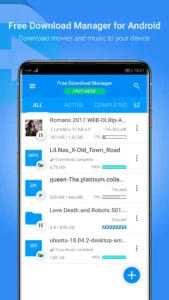
Free Download Manager – FDM is a comprehensive tool designed to help you manage your internet downloads more effectively. Developed by Google Commerce Ltd, this application allows you to download large files, music, videos, and torrents directly to your mobile device. Whether you need to organize your downloads or boost your transfer speeds, Free Download Manager – FDM provides the necessary functionality to handle your files with ease.
The core purpose of this app is to streamline how you capture content from the web. By splitting files into smaller sections and downloading them simultaneously, Free Download Manager – FDM can increase your download speeds significantly. You can also resume broken or expired links, which ensures that your progress is not lost if your connection drops unexpectedly.
Managing your storage is simpler when the app automatically organizes files by type into specific folders. If you need to manage your archives after downloading, you might also find ZArchiver Pro Donate useful for handling complex file formats. For users interested in running specialized software on their devices, Minecraft Java: PojavLauncher offers a unique way to expand your device’s capabilities.
Key Features of Free Download Manager – FDM
This utility is packed with features that cater to both casual users and those who download frequently. Key capabilities include:
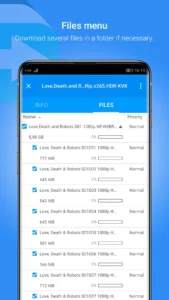
- BitTorrent Support: Download torrents using the BitTorrent protocol with full magnet link support and the ability to control file priorities.
- Media Format Compatibility: Supports a wide range of popular audio and video formats, such as MP4, MP3, MKV, AVI, and WEBM.
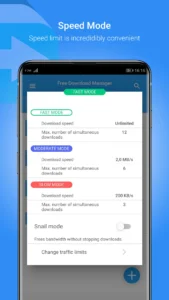
- Traffic Control: Adjust your bandwidth usage to ensure that your internet connection remains stable for browsing while your files download in the background.
- Scheduling: Set specific times for your downloads to start, allowing you to manage your data usage effectively.
- Wi-Fi Only Mode: Save your mobile data by configuring the app to trigger downloads only when a Wi-Fi connection is detected.
Getting Started and Permissions
To begin using Free Download Manager – FDM, simply install the APK and grant the necessary permissions. The app requires access to your storage to save downloaded files, as well as network access to navigate the web. Other permissions, such as Bluetooth, camera access, and audio settings, are used to support various integrated features. Please note that downloading from YouTube is not supported due to their terms of service.
Strengths and Limitations
Strengths:
- Supports torrents and magnet links.
- Organizes files automatically.
- Capable of resuming interrupted downloads.
- Allows for bandwidth and schedule management.
Limitations:
- Does not support downloading content from YouTube.
- Requires several device permissions to function correctly.
- User assumes full responsibility for any copyrighted content downloaded.
Frequently Asked Questions
Is Free Download Manager – FDM free to use?
Yes, this application is available as a free download.
Can I download files while offline?
No, the application requires an active internet connection to download files from the web.
Does this app work with torrents?
Yes, it supports BitTorrent protocol and magnet links, allowing you to manage torrent files directly.
