


Google’s Find Hub 3.1.805-02
Google LLC
November 22, 2026
20.9 MB
3.1.805-02
com.google.android.apps.adm
RELATED APPS






SCREENSHOTS
DESCRIPTION
Managing Devices and Connections with Google’s Find Hub APK
Google’s Find Hub is a utility developed by Google Commerce Ltd that helps you track your missing electronics and share your location with others. If you are looking for an Google’s Find Hub APK download to keep track of your hardware, this application acts as a centralized dashboard for your phone, tablet, headphones, and other compatible accessories. Whether you are trying to locate a misplaced device or coordinate a meeting with a friend, this app provides the necessary tools to keep your digital life organized and secure. It offers a unified approach to managing your personal tech ecosystem through a single, easy-to-navigate interface.
Key Features of Google’s Find Hub APK
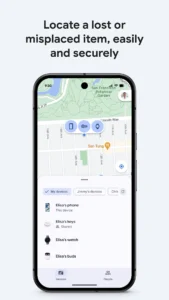
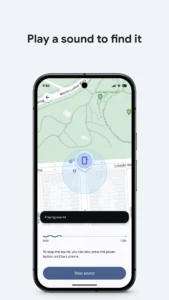
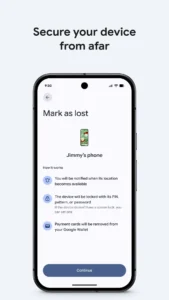
The primary function of Google’s Find Hub is comprehensive device tracking. You can view your registered hardware on a map, which works even if your devices are currently offline. If a device is nearby, you can trigger a sound to help you pinpoint its exact location. If you have permanently lost a phone or tablet, you can remotely secure the device or erase all data to protect your privacy. You can even set a custom message to appear on the lock screen for anyone who might find it. This makes Google’s Find Hub a versatile security tool for all your personal electronics, ensuring you have control over your hardware at all times.
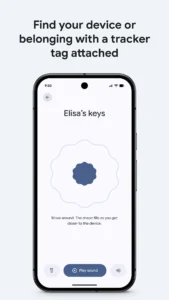
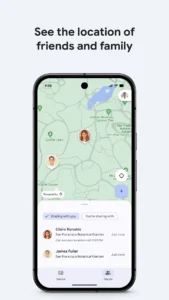
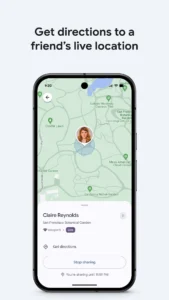
Beyond device management, the app includes live location sharing features. You can share your movements with friends to coordinate meetups or check in with family members to ensure they have arrived home safely. Recent updates allow you to locate compatible items even when your own phone is offline, provided the item is within Bluetooth range. For users who manage many files alongside their device settings, you might also find ZArchiver Pro Donate useful for your mobile storage needs, while gaming enthusiasts often look into Minecraft Java: PojavLauncher for their Android devices. These features combined help you maintain connectivity and organization across your entire digital environment.
Getting Started and Permissions
To use this utility, you must grant several permissions to ensure full functionality. The app requires access to your background, coarse, and fine location to display devices on a map. Bluetooth access is necessary for detecting nearby items, while the camera and contact permissions are used for specific identification and communication features. The app also uses biometrics and credential management to keep your account secure. Once installed, you will need to sign in with your Google account to sync your registered devices effectively. This setup process ensures that only you have access to your private device information, and it requires persistent network access to maintain the connection to your account and the broader network.
Strengths and Limitations
Strengths:
- Enables tracking of devices even when they are offline.
- Supports remote security features like locking and erasing data.
- Allows for real-time location sharing with friends and family.
- Encryption ensures that location data is private, even from Google.
- Available on both Mobile and supported Wear OS devices.
Limitations:
- Requires a wide range of permissions to function correctly.
- Relies on a constant Google account connection.
- The app size is 20.9 MB, which might be a factor for some users.
Who Should Use This App
This application is ideal for users who own multiple Google-compatible devices and want a single interface to track them. It is also well-suited for families who want to share their live locations for safety and coordination. If you do not own compatible hardware or want to avoid granting extensive location and Bluetooth permissions, this app may not be necessary for your daily routine. However, for those invested in the Google ecosystem, it provides peace of mind for lost items and helps keep your social circle informed about your location when needed.
Is Google’s Find Hub free?
Yes, Google’s Find Hub is free to use.
Does it work offline?
Yes, you can locate network-compatible items even if your phone is currently offline, provided the item is within Bluetooth range.
Can Google see my location data?
No, all location data in the network is encrypted and is not visible even to Google.
