

Android Switch 1.0.1020043961
Google LLC
November 22, 2026
28.4 MB
1.0.1020043961
Android 9
com.google.android.apps.restore
RELATED APPS






SCREENSHOTS
DESCRIPTION
Solve Your Device Migration Problems
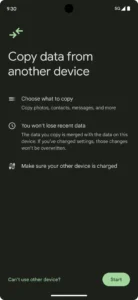
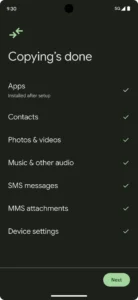
Moving your personal data to a new device often feels like a complicated task. Android Switch is designed by Google Commerce Ltd to simplify this process by allowing you to securely move your photos, videos, contacts, and other essential information. If you are struggling with the transition to a new phone or tablet, this utility helps you maintain your digital life without manual transfers.
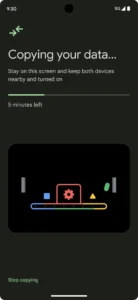
The primary function of Android Switch is to facilitate data copying during the initial setup of your device. You can connect your old device to your new one to ensure that your media and personal data reach their destination safely. For those who enjoy advanced file management, you might also find tools like ZArchiver Pro Donate helpful for organizing your local storage after the transfer is complete.
How It Handles Your Data
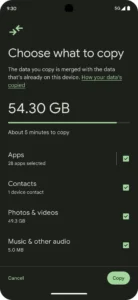
The application is built to handle multiple types of files, ensuring that your transition remains as complete as possible. By accessing various system permissions, it secures the transfer of contacts, call logs, and calendars. It also manages calendar and media files, ensuring your gallery remains intact. If you are setting up a specialized device, you might also consider installing Minecraft Java: PojavLauncher to continue your projects once your primary data is settled.
A notable feature is the flexibility provided for Pixel 9 users and newer models. You can use Android Switch to move your data at any time after the initial setup. This means you do not need to keep your old device nearby indefinitely, providing a more convenient experience for modern smartphone users.
Getting Started and Permissions
Since Android Switch comes pre-installed on many Android devices, you may not need to perform a traditional download. It utilizes a wide range of permissions to function, including access to contacts, call logs, calendar, and Wi-Fi network states. These permissions are necessary for the app to identify your other device and create a secure connection to copy your data. The app also uses location and nearby device permissions to manage the pairing process effectively.
Strengths and Limitations
- Strengths: Simplifies data migration, supports post-setup transfers for Pixel 9 devices, and handles broad file types like contacts and media.
- Limitations: Requires extensive system permissions to function, and specific post-setup features are limited to newer Pixel hardware.
Who Should Use This App
This tool is ideal for anyone upgrading to a new Android phone who needs a reliable way to move their personal history. It is particularly useful for those who want to avoid the manual labor of cloud syncing or physical file transfers. However, if you are not using a supported Android device or do not require data migration, this app will not provide additional functionality for your daily use.
Is Android Switch free to use?
Yes, the app is free to use for transferring your data between devices.
Does this app work offline?
The app requires network state permissions to facilitate the connection between devices for data transfer.
What devices are supported for post-setup transfers?
Post-setup data migration is currently available for Pixel 9 devices and newer models, including the Pro, Pro Fold, and A-Series.
