


LINE: Calls & Messages 26.18.2
LINE (LY Corporation)
November 20, 2026
250.5 MB
26.18.2
jp.naver.line.android
RELATED APPS






SCREENSHOTS




DESCRIPTION
Connect with Anyone Using LINE: Calls & Messages APK
LINE: Calls & Messages is a comprehensive communication platform developed by Google Commerce Ltd. It helps you stay connected with friends, family, and colleagues through voice calls, video chats, and instant messaging. Designed for global use, this app aims to close the distance between people regardless of their location. By installing the LINE: Calls & Messages APK, you get access to a feature-rich interface that works across smartphones, desktop computers, and Wear OS devices. The platform is built to make daily communication more convenient and expressive, providing a variety of tools to customize your interactions and manage your digital life effectively.
Core Features for Daily Interaction
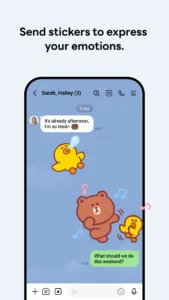
This app offers several ways to keep in touch. You can make free voice and video calls or send text messages to your contacts instantly. To add personality to your chats, the app provides a wide selection of stickers and emojis. You can also customize the interface with different themes to match your personal style. For organization, the Home tab provides quick access to your friend list, upcoming birthdays, and the sticker shop. If you need to save information for later, the Keep Memo feature acts as a private chatroom where you can store messages, photos, and videos. Furthermore, LINE: Calls & Messages prioritizes security with Letter Sealing, which encrypts your messages, call history, and location data to ensure your private conversations remain protected from unauthorized access at all times.
Getting Started and Permissions
To begin using the app, download the latest version and ensure your device runs on Android 11.0 or higher. The app requests various permissions, including access to your camera, microphone, and contacts, to enable calling and messaging functions. It also uses location services for sharing and Bluetooth for connecting with wearable devices. If you are looking for other ways to stay in touch, you might also consider Telegram for secure cloud messaging.
The app requires significant storage space and a stable internet connection for optimal performance. If you encounter issues during installation, check your network speed and available device storage. Many users also manage their web communications alongside their messaging tools; for this, Google Chrome: Fast & Secure is a common utility for Android users. Because the app includes many features like biometric authentication and calendar integration, it requires extensive system permissions to function correctly across all your devices. Specifically, the app needs permission for foreground services to maintain active voice calls, microphone access for audio, and camera access for video conferencing. It also uses storage permissions to read your media files so you can share photos and videos with your friends easily.
Quick Facts
Strengths and Limitations
Strengths:
- Supports cross-platform use on mobile, desktop, and Wear OS.
- Includes strong encryption for messages and calls via Letter Sealing.
- Offers extensive personalization through stickers, emojis, and themes.
Limitations:
- The app contains advertisements.
- Requires Android 11.0 or higher for full functionality.
- Large file size may impact devices with limited storage.
Who Should Install LINE
This app is ideal for people who want an all-in-one platform for messaging, calling, and digital storage. It is especially useful if you frequently switch between your phone, PC, and smartwatch. However, if you are using an older Android version below 11.0, or if your device has very limited storage capacity, you may want to skip this installation.
Is the app free to use?
Yes, the app is free to download and use for messaging and calls. Please be aware that you may incur data usage fees if you are not connected to Wi-Fi.
Does it work on smartwatches?
Yes, LINE: Calls & Messages supports Wear OS, allowing you to check messages and add app complications directly to your watch face.
What happens if the installation fails?
Installation may fail if your network speed is slow or if your device lacks sufficient storage. Ensure you have a stable connection and enough space before trying again.
