

Microsoft Surface 2.1724.0
Microsoft Corporation
November 22, 2026
63.0 MB
2.1724.0
Android 7.0
com.microsoft.surfaceaudio
RELATED APPS






SCREENSHOTS
DESCRIPTION
The Microsoft Surface application serves as the primary companion for owners of Surface Earbuds and Surface Headphones. Developed by Microsoft Corporation, this tool allows you to manage your hardware directly from your Android device. Whether you need to update firmware or adjust your listening experience, this app provides the necessary controls for your audio gear. By using the Microsoft Surface APK, you gain a centralized hub for all your device management tasks.
Getting Started with Microsoft Surface APK
To begin using the app, download the Microsoft Surface APK and install it on your Android device running version 7.0 or higher. Upon launching, the app requires several permissions to function correctly. It uses Bluetooth permissions to scan, connect, and manage your headphones. Location permissions are requested to assist with device pairing and network management, while storage and system settings permissions help the app handle firmware updates and display notifications properly. The app also uses background services to maintain connection status while you use other applications.
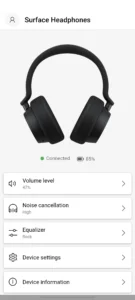
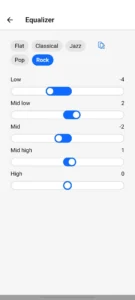
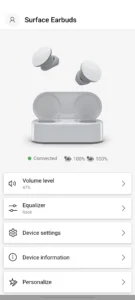
Once connected, you can view real-time battery status and current volume levels for your devices. The interface allows you to manage active connections, ensuring you know exactly which device is paired at any given time. You can also modify equalizer settings to match your specific sound preferences, giving you full control over your listening profile. For those who want to explore other audio tools, you might look at Sound Assistant to manage your device audio profiles further. If you prefer a different interface for your local files, you could consider Meulify for your playback needs.
Key Features for Your Audio Hardware
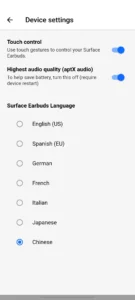
The Microsoft Surface app offers several practical features to keep your hardware running optimally. You can perform firmware updates to ensure your earbuds or headphones have the latest features and bug fixes. The app also allows you to change language settings and view detailed device information. If you encounter connectivity issues, you can use the built-in reset function to return your hardware to factory settings. Additionally, you can watch tutorial videos directly in the app to learn how to use your device features effectively. This comprehensive control makes the Microsoft Surface APK an essential download for anyone invested in the Surface audio ecosystem.
Strengths and Limitations
Strengths:
- Direct control over firmware updates for Surface audio hardware.
- Easy access to battery levels and volume monitoring.
- Includes helpful tutorial videos for new users.
- Allows full customization of equalizer settings.
- Provides a direct channel to send feedback to the development team.
Limitations:
- Requires numerous permissions, including location and Bluetooth, for full functionality.
- Exclusively compatible with specific Surface audio hardware.
- The installation package size is 63.0 MB.
Who Should Install It
You should install this app if you own Surface Earbuds or Surface Headphones and want to keep them updated. It is essential for users who want to personalize their sound output through the equalizer or monitor battery life. If you do not own these specific devices, this app will not provide any utility for your Android phone.
Frequently Asked Questions
Is the Microsoft Surface app free?
Yes, the app is free to download and use.
Does it work offline?
While the app manages your hardware via Bluetooth, some features like downloading firmware updates require an active internet connection.
Which Android version is required?
This app requires Android 7.0 or higher to function on your device.
