


Pianora : Learn Piano Songs 0.1.0
2002 Studio
November 22, 2026
58.4 MB
0.1.0
Android 8.0
com.metagamesstore.popit
RELATED APPS



SCREENSHOTS
DESCRIPTION
Master the Piano with the Pianora : Learn Piano Songs APK
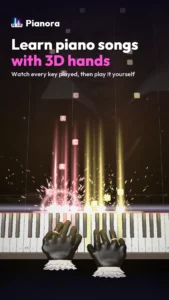
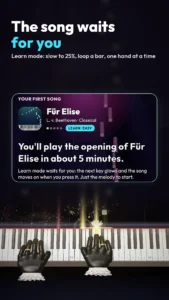
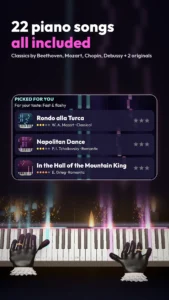
If you have ever watched viral piano videos and wanted to learn those songs yourself, the Pianora : Learn Piano Songs APK offers a structured way to start. Developed by 2002 Studio, this app acts as both a game and a patient piano teacher. It uses falling note tiles on a 3D keyboard, combined with animated hands that show you exactly how to play. Whether you are a total beginner or looking to refine your musical skills, the app guides you through 22 included classical favorites like Für Elise and Clair de Lune.
The core experience centers on visual learning. As the music plays, 3D hands demonstrate the correct fingering, reach, and rhythm on the screen. You can choose from various hand styles, including realistic skin tones or animated gloves. If you prefer to learn at your own speed, the app includes a special mode where the next key glows, and the song only proceeds once you press the correct note. You can also slow down any track to 25% of its original speed, making it easier to practice difficult sections or focus on one hand at a time.
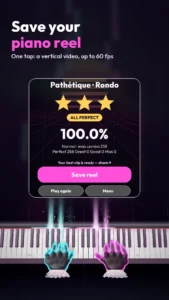
Beyond the built-in library, you can import your own MIDI files to see them transformed into falling note lessons. For those who own hardware, the app supports connecting a USB or Bluetooth MIDI keyboard, allowing you to practice on real keys. Pianora : Learn Piano Songs also includes a recording feature that turns your performance into a 1080×1920 video suitable for social media. You can explore Blink Hop: Tiles & Blackpink to discover rhythm-based music games with a different style. This versatile piano tool adapts to your needs with four difficulty levels for every song, ranging from melody-only easy tracks to full pro arrangements.
Getting Started and Permissions
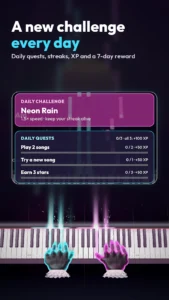
To begin, simply install the Pianora : Learn Piano Songs APK and open the app. There is no account registration required to start playing. The app requests several permissions to function correctly. It uses INTERNET and ACCESS_NETWORK_STATE to manage data, while READ_EXTERNAL_STORAGE is necessary for importing your own MIDI files. Other permissions like VIBRATE, WAKE_LOCK, and POST_NOTIFICATIONS help provide a responsive gaming experience and keep you updated on daily challenges. Those who want to explore more technical piano tools might also look at Real Piano, which serves as a standard digital keyboard for Android.
App Features and Customization
- Learn at your own pace with adjustable speeds and note labels in letters or solfège.
- Supports MIDI keyboard connection via USB or Bluetooth for a realistic playing feel.
- Includes a high-quality recording feature for sharing your piano reels.
- Access 22 classical piano songs or import your own MIDI files for custom practice.
Strengths and Limitations
- Learn at your own pace with adjustable speeds and note labels.
- Supports MIDI keyboard connection for a realistic playing feel.
- Includes a recording feature for sharing your piano reels.
- Requires several permissions for full functionality, including storage access.
Frequently Asked Questions
Is Pianora : Learn Piano Songs free to use?
Yes, the app is free. It does not require a paid subscription or account to access the features.
Can I play this game offline?
Yes, the app works offline, making it convenient for practicing without an active internet connection.
Does it support real piano keyboards?
Yes, you can connect a digital piano or MIDI keyboard via USB or Bluetooth to play along with the app.
Which Android versions are supported?
The developer has not specified a minimum Android version, but the app is designed to run on modern Android devices.
