


Suno - AI Music & Songs Maker 1.97.1
Google Commerce Ltd
November 20, 2026
58.2 MB
1.97.1
com.suno.android
RELATED APPS





SCREENSHOTS
DESCRIPTION
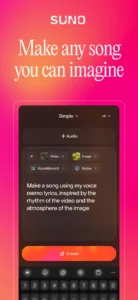
Have you ever wanted to turn a poem, chat text, or hummed melody into a complete song without spending hours in a studio? The Suno – AI Music & Songs Maker app for Android lets you generate original tracks across hip hop, pop, rock, electronic, jazz, and country styles using simple prompts. Downloading the Suno – AI Music & Songs Maker APK puts an automatic AI music generator in your hand, turning simple ideas into full audio tracks with custom lyrics and instrumentation.
How Does Suno – AI Music & Songs Maker APK Generate Songs?
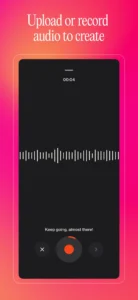
The app converts input prompts into complete musical compositions. You can type a sentence, tap out a basic rhythm, hum a short tune, or upload an existing audio snippet. The internal generator processes your idea and produces a finished track with matching vocals, instrumentation, and arrangement. Every track generated through the system is an original creation that you can listen to, save, and share with other users.
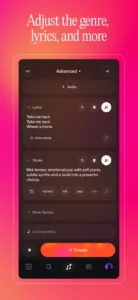
Beyond instrumentals, the platform includes a dedicated lyrics maker. If you enter text from a study guide, a group chat, or a custom poem, the system crafts rhyming lyrics adjusted to your selected genre. While listening apps like Meulify focus primarily on playing pre-recorded audio files, Suno – AI Music & Songs Maker builds brand-new tracks from scratch based entirely on your input.
Key Creative Features and Audio Control
The application offers structured tools designed for basic users as well as advanced editors who want deep control over their output:
- Prompt-to-Song Generation: Create songs in any genre, including R&B, rap, pop, rock, and electronic, by entering descriptive text or humming.
- AI Lyrics Creator: Automatically turn raw text, messages, or notes into structured verse-chorus song lyrics.
- Suno Studio Workstation: Fine-tune melodies, adjust vocal delivery, edit song structures, and add instrumental tracks to refine your songs.
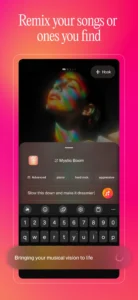
- Voice Recording and Remixing: Record your own voice directly inside the app to remix existing tracks or add personal vocal overlays.
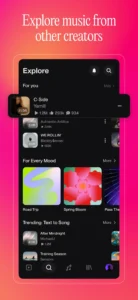
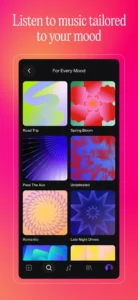
- Community Feed and Playlists: Share your tracks, discover trending creations from global creators, follow users, and organize songs into playlists.
If you regularly tweak Android sound settings using utility tools like Sound Assistant, you will appreciate how easily you can adjust vocals and track structures directly within the built-in studio interface.
Installation Setup and Required Permissions
To run the Suno – AI Music & Songs Maker latest version smoothly, your device requires specific system permissions to support audio recording, media saving, and community features:
- RECORD_AUDIO: Required to capture your humming, vocal melodies, or voice recordings for song generation and remixing.
- CAMERA: Allows taking photos or videos for profile setup and media attachment.
- READ_MEDIA_AUDIO and Storage Access: Necessary for importing existing audio samples and saving exported song files to your device storage.
- POST_NOTIFICATIONS: Delivers updates when your song finishes generating or when users interact with your shared tracks.
- INTERNET and Network State: Used to connect to online servers that process AI audio requests and update the community feed.
- Billing Access: Supports optional in-app subscriptions managed through your primary Google Account payment method.
Quick App Details
Strengths and Limitations
Before installing Suno – AI Music & Songs Maker for Android, review its main advantages and practical limitations:
Strengths:
- Generates full songs from text, audio hums, or rhythmic taps.
- Includes studio editing features to tweak vocal styles and instrumental layers.
- Generates lyrics automatically from regular text or poems.
- High community rating of 4.8/5 across over 2.6 million user reviews.
Limitations:
- Requires an active internet connection to generate audio tracks.
- Advanced features rely on optional auto-renewing subscriptions charged to your Google Account.
- Requires microphone and storage permissions to access vocal recording features.
Who Should Install This App?
You should install this software if you want to experiment with instant songwriting, turn notes into music, or produce original beats directly on your mobile device without specialized studio equipment. It works well for casual creators, lyricists, and music enthusiasts looking to publish tracks into an active global community.
You may want to skip this app if you are looking strictly for an offline local media player or do not want an app that requires network connectivity and account creation to render audio.
Frequently Asked Questions
Is the Suno – AI Music & Songs Maker download free?
Yes, the application is listed under a free pricing model. It includes optional paid subscriptions that charge your Google Account payment method upon confirmation and renew automatically unless canceled at least 24 hours before the period ends.
How big is the Suno – AI Music & Songs Maker APK file?
The download file size for version 1.97.1 is 58.2 MB. Additional storage space may be needed as you generate and save audio files.
Can I record my own voice to create tracks?
Yes. The app requests RECORD_AUDIO permission so you can record your voice, hum melodies, or produce remixes using your phone’s microphone.
