

Voice Recorder & Voice Memos 1.3.8.0
Simple Design Ltd.
November 22, 2026
43.9 MB
1.3.8.0
Android 8.0
voicerecorder.audiorecorder.voice
RELATED APPS





SCREENSHOTS


DESCRIPTION
Record Audio Easily on Your Android Device
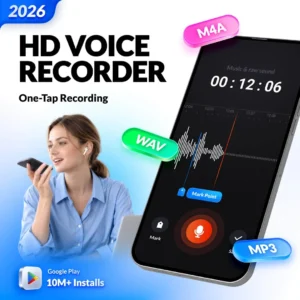
If you need a reliable way to capture meetings, lectures, or personal voice memos, Voice Recorder & Voice Memos offers a straightforward solution. Developed by Simple Design Ltd., this application is designed for users who want high-quality audio capture without complex settings. Whether you are a student, a professional, or a musician, this tool provides the functionality to record any sound with just one click.
The app includes several specialized recording modes to suit your environment. You can choose from presets like Meetings & Lectures, Music & Raw Sound, or the standard mode for daily notes. The software supports both stereo and mono recording, and you can even customize the sample rate and bit rate for better output quality. To keep your files organized, the app allows you to add tags to recordings and sort them by name, time, size, or duration.
Powerful Features for Every Situation
Voice Recorder & Voice Memos excels in providing professional-grade audio features in a user-friendly package. You can utilize noise suppression, echo cancellation, and automatic gain control to ensure your recordings are clear. For those who need to capture game audio or online meetings, the internal recording mode lets you record your phone’s system sound directly. If you enjoy listening to high-quality audio files, you might also be interested in the Meulify music player for your library.
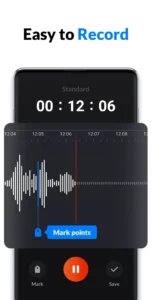
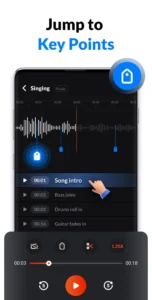
The app supports background recording and screen-off recording, so you can continue capturing audio even while using other apps. If you need to manage your device audio settings beyond basic recording, tools like Sound Assistant can provide additional control over your phone’s volume and output. The app also offers convenient features like adding markers during recording to find key points later, and the ability to trim or cut your saved files.
Installation and Permissions
To get started, simply download the Voice Recorder & Voice Memos APK and install it on your device. The app requires several permissions to function correctly. It needs access to your microphone and media storage to record and save audio files. Other permissions, such as Bluetooth and network state, are used to support file sharing and ad services. Because this is a free app, it displays advertisements to support ongoing development.
Strengths and Limitations
Strengths
- Supports high-quality audio with customizable bit rates.
- Includes dedicated internal recording for system audio.
- Organizes files with tags and markers for easy navigation.
- Allows saving recordings directly to an SD card.
Limitations
- The app is supported by ads.
- Requires multiple permissions for full functionality.
- Does not support phone call recording.
Who Should Use This App
This application is ideal for students who need to record long lectures or workers who need to capture meeting notes. Musicians will appreciate the high-quality raw sound mode for capturing inspiration on the go. If you prefer a simple, no-nonsense interface for your daily voice memo needs, this tool is a great choice. Users who require phone call recording will need to look elsewhere, as that feature is not supported.
Is the app free to use?
Yes, Voice Recorder & Voice Memos is free to download and use, though it is supported by advertisements.
Does it support offline recording?
Yes, you can record audio without an active internet connection. Your files are stored locally on your device or SD card.
Can I edit my recordings within the app?
Yes, the app includes basic editing tools that allow you to trim or cut your recordings after they have been saved.
