

Call Blocker - Block Numbers 9.6
Glad Appvestor
November 22, 2026
46.7 MB
9.6
com.smsrobot.call.blocker.caller.id.callmaster
RELATED APPS






SCREENSHOTS
DESCRIPTION
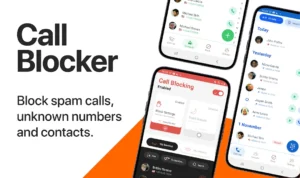
If you are tired of receiving unwanted robocalls and telemarketing interruptions, Call Blocker – Block Numbers is designed to help you regain control of your phone. Developed by Glad Appvestor, this application serves as a comprehensive tool for filtering incoming communications and identifying unknown numbers. With over 10 million installs, it provides a dedicated solution for users who want to avoid fraud and spam on their mobile devices. Many users rely on the Call Blocker – Block Numbers APK to simplify their daily communication management and keep their contact lists clean from unwanted callers. This app is built to handle the frustration of persistent solicitors by providing a robust, automated defense system that works in the background of your device.
Understanding the Call Blocker – Block Numbers APK Features
The primary function of Call Blocker – Block Numbers is to filter your incoming traffic. It leverages an extensive spam database to automatically identify and block robocalls, telemarketing attempts, and potential fraud. When you receive a call, the app checks the number against known spam data, allowing you to filter out nuisance callers before they disrupt your day. By installing the Call Blocker – Block Numbers APK, you gain access to a reliable shield against persistent solicitors and automated systems. The software is designed to handle common communication issues that traditional phone apps might overlook, ensuring you only answer the calls you actually want.
- Automatic spam detection using an extensive database.
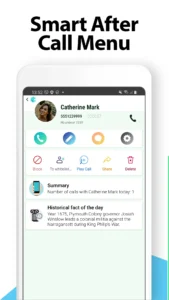
- Instant blocking via the after-call menu.
- Real-time caller ID for unknown numbers.
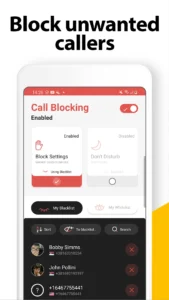
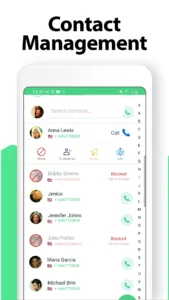
- Customizable blacklist management for contacts.
- Dedicated tools to block robocalls and telemarketers.
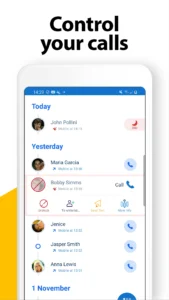
A notable addition is the after-call menu, which lets you instantly block a number immediately after you finish a conversation. This feature is useful for quickly adding persistent callers to your blacklist. Additionally, the app includes a caller ID function to help you see who is contacting you, even if the number is not saved in your personal contact list. The application requires several permissions to function, including access to your call logs, phone state, and contacts. It uses a draw-over-other-apps permission to display real-time spam warnings on your screen. If you need to manage other communication tools, you might also consider Telegram for secure messaging or Google Chrome: Fast & Secure for your mobile browsing needs. These tools complement your communication setup by providing alternative ways to stay connected while keeping your device secure and organized.
Getting Started with the App
To begin using Call Blocker – Block Numbers, download and install the APK file on your Android device. Upon opening, the app will request various permissions to manage your phone calls and display alerts. The developer notes that the app uses accessibility capabilities to control volume keys, though it does not collect or send your personal information. Ensure you grant the necessary permissions to allow the software to function correctly as a primary call filter. By granting these permissions, you allow the app to monitor incoming calls and provide you with the necessary warnings before you answer a potential scam.
- Grant call log and contact access for identification.
- Enable the display over other apps permission for warnings.
- Activate notification permissions for instant alerts.
- Set the app as your preferred tool for call management.
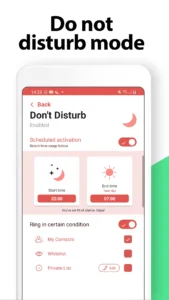
The interface is built to provide an after-call screen, making it simple to blacklist numbers you do not recognize. By using the settings provided, you can customize your filter to block unknown callers or specific numbers from your contact list. This level of customization ensures that you maintain control over who can reach you at any time of the day.
Strengths and Limitations
This tool is ideal for anyone who receives frequent spam calls or wants a clearer view of who is calling them. The strengths include a massive database of known spam numbers and a very intuitive after-call blocking feature. However, users should be aware that the app is supported by advertisements and requires an internet connection to keep its spam detection databases updated. If you prefer a minimalist phone experience without extra filtering software, this app may not be necessary for your daily usage. The Call Blocker – Block Numbers APK remains a highly effective choice for those who value peace of mind during their daily phone interactions.
Is this app free to use?
Yes, Call Blocker – Block Numbers is free to download and use, though it is supported by ads.
Does it work offline?
The app requires an active internet connection to access the latest spam database information for accurately identifying and blocking unwanted callers.
What is the latest version available?
The current version provided is 9.6, which includes recent improvements and bug fixes to ensure smoother performance.
