


Dolby On: Record Audio & Music 1.10.1
Dolby Laboratories Inc.
November 22, 2026
63.3 MB
1.10.1
Android 8.0
com.dolby.dolby234
RELATED APPS


SCREENSHOTS
DESCRIPTION
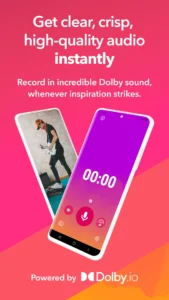
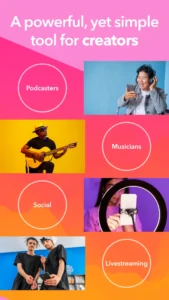
Can your Android device produce clear studio-quality sound without buying expensive external gear? The Dolby On: Record Audio & Music APK offers an automated solution by applying advanced audio processing directly to your voice memos, song demos, and video captures. Published by Google Commerce Ltd, this free tool helps musicians, podcasters, and content creators capture clean audio by reducing unwanted background noise with a single tap.
How Does Dolby On: Record Audio & Music APK Improve Audio Quality?
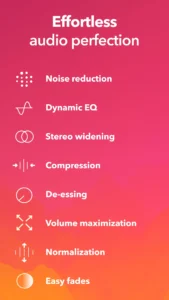
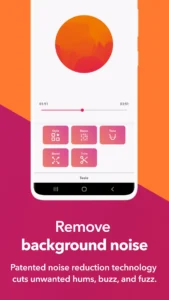
When you record songs or spoken audio on a mobile phone, background hiss and flat tones often ruin the track. Dolby On: Record Audio & Music solves this by running real-time processing effects after you tap record. It applies noise reduction, de-essing, dynamic EQ, and spatial audio to shape sound clarity and spatial depth. You can also apply compression and limiting to boost volume without causing harsh distortion.
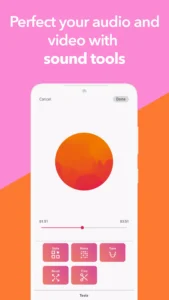
To customize your sound, the app features six sound tools that act like visual filters for your audio tracks. You can fine-tune treble, bass, and midrange frequencies, or use built-in trim tools to remove silence from the start and end of a take. If you already have existing audio files, you can import them into the app to apply Dolby processing. For users who stream music or manage offline sound collections alongside apps like Meulify, having polished files ready for playback makes a noticeable difference.
What Can Creators Do With Built-In Tools and Export Options?
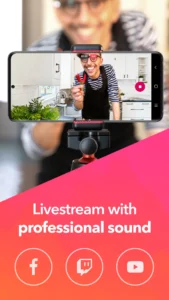
Whether you are documenting band rehearsals, capturing beat ideas, or filming video content for social media, the app supports both audio and video modes. It works with internal microphones as well as supported external mics. The latest update adds file search, hashtag support, and bulk export capabilities to help organize large libraries of audio clips.
Once audio processing is complete, you can share files directly to SoundCloud or export tracks for social platforms such as Instagram, Facebook, and TikTok. For advanced production work, you can export uncompressed files to external digital audio workstations like Ableton, Logic Pro, Pro Tools, or BandLab. If you adjust audio settings across apps using tools such as Sound Assistant, having clear gain levels and optimized loudness preset inside your recorder prevents clipping when sharing tracks via text or email.
Getting Started and Permissions Overview
Installing the Dolby On: Record Audio & Music download is simple. After downloading the 63.3 MB installation package, open the application and grant the necessary permissions for proper functionality:
- Microphone (RECORD_AUDIO): Required to capture live audio, instrument takes, and voice memos.
- Camera (CAMERA): Needed if you record video performances directly inside the app.
- Storage (READ_EXTERNAL_STORAGE): Allows the app to import existing audio tracks and save exported files.
- Notifications (POST_NOTIFICATIONS): Used to display recording status updates while running in the background.
- Network Access (INTERNET & ACCESS_NETWORK_STATE): Needed to share finished recordings to social platforms and SoundCloud.
Quick Specifications
Strengths and Limitations
Strengths
- Free automatic studio effects including noise reduction, limiting, dynamic EQ, and spatial audio.
- Six preset styles and trimming tools for fast sound editing.
- Supports audio and video recording with external microphone integration.
- Direct export options to SoundCloud, social media, and desktop DAWs.
- Bulk export, hashtag support, and file search in the latest update.
Limitations
- Requires multiple system permissions including camera, microphone, and storage access.
- Requires network access for online sharing functions.
Who Should Install This App?
You should install Dolby On: Record Audio & Music for Android if you frequently record acoustic instruments, vocals, rehearsals, podcasts, or field samples and want instant audio enhancements without paid subscriptions. The app works well for creators needing quick video and audio clips ready for social media.
You may skip it if you only need a basic voice memo app with no audio processing effects or if you prefer not to grant storage, camera, and microphone permissions.
Frequently Asked Questions
Is Dolby On: Record Audio & Music free to use?
Yes, the app is free to download and use with no upfront purchase cost listed.
Can I export my recordings to music production software?
Yes, you can export your processed audio files and samples directly to DAWs such as Ableton, Logic Pro, Pro Tools, or BandLab.
What features were added in the latest version?
The Dolby On: Record Audio & Music latest version (1.10.1) introduced file search, hashtag support, bulk export capabilities, bug fixes, and improved Android compatibility.
Can I import existing audio files into the app?
Yes, you can import audio files recorded in other applications into Dolby On to edit and apply Dolby audio processing effects.
APP TRAILER
