


Microsoft 365 Admin 6.0.0.0
Microsoft Corporation
November 22, 2026
68.7 MB
6.0.0.0
Android 5.0
com.ms.office365admin
RELATED APPS






SCREENSHOTS
DESCRIPTION
The Microsoft 365 Admin app is a dedicated tool for enterprise and business administrators who need to oversee their subscriptions from a mobile device. If you are looking for the Microsoft 365 Admin APK, this mobile interface allows you to handle critical management tasks without being tied to a desktop computer. Developed by Microsoft Corporation, this tool ensures you can maintain control over your organization’s environment whether you are in the office or traveling. The app provides a secure way to access your administrative portal, ensuring that business continuity is maintained even when you are away from your primary workstation.
Using the Microsoft 365 Admin APK for Management
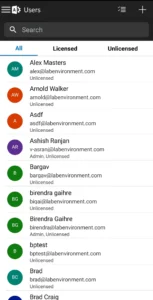
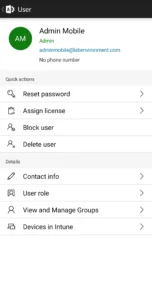
This application is designed to streamline your daily administrative workflow. You can easily add, edit, block, or delete users within your organization. The app also allows you to reset passwords, assign specific roles, and manage user aliases or devices directly from your phone. If you need to organize your team, you can manage groups by adding or removing members with just a few taps. By centralizing these tasks, the application reduces the time spent on routine maintenance.
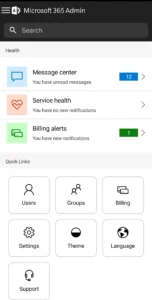
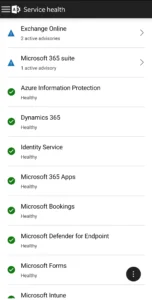
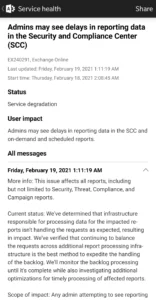
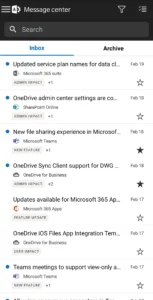
Monitoring your subscription health is another primary function. You can view all assigned licenses, manage license allocations, and even download invoices. If a technical issue arises, you can create new support requests or check the status of existing ones. The Service Health dashboard keeps you informed about active incidents, while the Message Center feed ensures you stay updated on upcoming service changes. These features provide visibility into your organization’s status, helping you stay proactive rather than reactive.
For those who manage multiple environments, the app supports multi-tenant sign-in. This allows you to switch between different organizations quickly. With its support for dark theme and availability in 39 languages, Microsoft 365 Admin provides a flexible experience for global users. You can also receive push notifications to stay updated on billing, service health, or important announcements. These alerts are customizable, so you only get notified about the information that is most relevant to your role.
If your daily workflow involves frequent collaboration, you might also find the Google Meet application helpful for video conferencing needs. Additionally, for those interested in leveraging artificial intelligence for productivity, Bing: Chat with AI & GPT-4 offers advanced search capabilities and mobile assistance.
Getting Started
To begin using the app, download and install the Microsoft 365 Admin package. Upon launch, you will need to sign in with your administrator credentials. The app requires several permissions to function, including access to your network state, internet connectivity, and account management tools. It also requests access to your camera and external storage to handle documentation and support-related tasks. Biometric and fingerprint permissions are used to ensure your account remains secure while you are on the move. The app also manages phone states and notifications to ensure that push alerts are delivered promptly.
Strengths and Limitations
- Strengths: Enables remote management of users and licenses; multi-tenant support for administrators managing multiple businesses; push notifications for service health updates; supports 39 languages and dark theme.
- Limitations: Requires an active enterprise or business subscription; extensive permission requirements may concern privacy-conscious users; limited to administrative tasks only; requires an active data connection.
App Technical Specifications
Who Should Use This App?
This app is intended exclusively for individuals who hold an administrator role for a Microsoft 365 or Office 365 business subscription. If you do not have administrative access, the features within the app will not be applicable to your account. It is a powerful utility for IT staff or business owners who need to perform quick fixes or monitor system health while away from their primary workstation.
Frequently Asked Questions
Is the Microsoft 365 Admin app free?
Yes, the app is free to download and use for administrators with an existing Microsoft 365 or Office 365 subscription.
Does it work offline?
No, the app requires an active internet connection to sync with your organization’s data, manage users, and receive real-time notifications.
Which Android version is required?
You need a device running Android 5.0 or higher to install and run the application.
