


Notepad, Notes, Easy Notebook 1.4.4.103
Simple Design Ltd.
November 22, 2026
51.2 MB
1.4.4.103
Android 8.0
notes.notepad.checklist.calendar.todolist.notebook
RELATED APPS






SCREENSHOTS


DESCRIPTION
Getting Started with Notepad, Notes, Easy Notebook APK
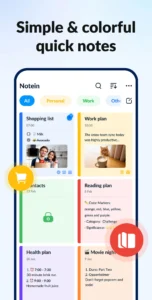
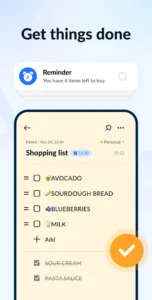
If you need a reliable way to manage daily tasks and capture quick thoughts, Notepad, Notes, Easy Notebook provides a clean interface for your Android device. Developed by Simple Design Ltd., this app functions as a versatile memo pad that combines text notes and checklist modes. By downloading the Notepad, Notes, Easy Notebook APK, you gain access to a tool designed to replace physical paper with digital convenience. To get started, install the app and allow the requested permissions. These include access to your network state for synchronization, storage permissions to read and write your files, and notification settings to ensure you receive your reminders on time. It also uses foreground services to maintain active reminders and alarms, ensuring that your scheduled tasks are never missed throughout your busy day.
Features of Notepad, Notes, Easy Notebook APK
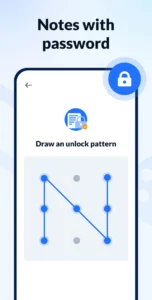
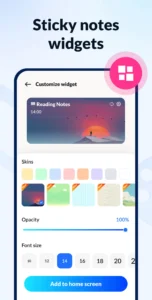
This application simplifies your daily workflow with several distinct features. You can create sticky notes widgets on your home screen, allowing you to view and edit your tasks without opening the full app. The calendar integration helps you map out your schedule by associating specific notes with dates, making it an excellent companion for time management. For those concerned about privacy, the app includes a password lock feature to keep your sensitive information secure. This ensures that personal memos or private lists remain protected from unauthorized access at all times.
Managing your data is easy thanks to color-coding options. By assigning different colors to your notes, you can categorize tasks like shopping lists or meeting notes for faster retrieval. The Notepad, Notes, Easy Notebook app also features automatic saving, ensuring that your text or checklist entries are preserved as you type. If you are looking for other tools to boost your efficiency, consider using Google Meet for your professional calls or MediaFire for backing up your important documents. The app also supports cloud backup, so you can keep your data safe and restore it whenever you switch devices.
Quick Facts
Strengths and Limitations
The app offers several advantages for users who want a clean note-taking experience:
- Sticky widgets for quick home screen access.
- Calendar view for better time management.
- Password protection for private memos.
- Automatic cloud backup support.
However, keep these points in mind:
- The app is supported by ads.
- It requires various permissions for full functionality, including exact alarms and network access.
- Some advanced features may require in-app purchases.
Who Should Use This App?
Notepad, Notes, Easy Notebook is ideal for students, busy professionals, and anyone who needs a quick, visual way to track to-do lists. If you prefer a simple interface that mirrors the feel of physical pen and paper, this application is a great fit. Users who require an offline-first experience for basic notes but want the option to sync via cloud backups will find it particularly useful. If you are looking for a complex project management suite with team collaboration, you may want to look elsewhere as this tool focuses on personal organization.
Is the app free to use?
Yes, the app is free to download and use, though it includes advertisements to support development.
Does it work offline?
Yes, you can write and manage your notes offline, and your data is stored locally. Cloud backup features are available when you have an internet connection.
How do I secure my notes?
You can use the built-in locker feature to set a password for specific notes, ensuring that only you can access them.
Which Android version is required?
The app is compatible with a wide range of Android devices, though specific minimum requirements are not provided.
