


Vivaldi Browser: Fast, Private 8.3.4192.96
Vivaldi Technologies
November 24, 2026
342.0 MB
8.3.4192.96
Android 10
com.vivaldi.browser
RELATED APPS





SCREENSHOTS



DESCRIPTION
Are you concerned about online privacy and constant tracking while browsing? Do unwanted ads slow down your internet experience? The Vivaldi Browser: Fast, Private app offers a solution. Developed by Vivaldi Technologies, this free Communication app provides a web browser focused on user control and privacy. It includes tools to block ads and trackers, helping you browse the internet more securely and efficiently on your Android device.
Protect Your Privacy and Block Trackers
Vivaldi Browser APK helps you take control of your online privacy. The app features a built-in Ad and Tracker Blocker. You can choose from different blocking levels: Off, Light, Strong, or Aggressive. These levels can be set globally or customized for specific websites. For example, you might set a bank website to ‘Light’ to ensure all forms work, while a video site could be ‘Aggressive’. The browser remembers your choices. You can also create custom block lists and view a Privacy Report to see what was blocked.
For added security, the app includes a free built-in VPN when you use your Vivaldi account. This VPN encrypts your connection and hides your IP address from websites. It covers your browsing within the app, without needing a separate VPN installation. This feature helps protect your identity online. If you are looking for other secure communication options, consider Telegram for encrypted messaging.
Advanced Browsing Features for Mobile
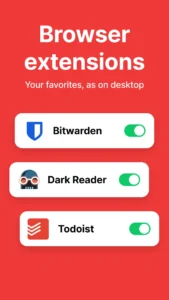
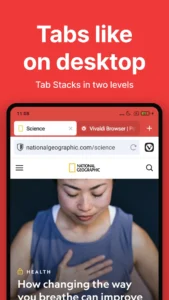
Vivaldi Browser brings many desktop-class features to your Android phone. It supports browser extensions, allowing you to use tools you rely on from your computer. The interface is designed for larger screens and tablets, featuring two rows of tabs and Tab Stacks. Tab Stacks let you group and expand related tabs. You can also long-press a link to open it directly into a chosen Tab Stack.
The browser includes a built-in PDF reader and a Reader View for easier reading of articles. It also offers private translation for over 100 languages. Pages load quickly because ads and trackers are blocked, which often slow down web pages. If a website works better in its dedicated app, you can tap ‘Open in app’ to switch seamlessly. You can find more information about popular apps on whats download.
Getting Started with Vivaldi Browser
Installing the Vivaldi Browser: Fast, Private app is straightforward. After download, follow the on-screen prompts to install it on your Android device. The app is free to use. When you first open the browser, you can choose your preferred ad and tracker blocking level. The app asks for several permissions to function correctly.
- android.permission.INTERNET: This is needed to access websites online.
- android.permission.CAMERA / RECORD_AUDIO: These allow video calls or photo uploads directly from the browser.
- android.permission.ACCESS_FINE_LOCATION / ACCESS_COARSE_LOCATION: These enable location-based services if you grant permission to specific websites.
- android.permission.READ_EXTERNAL_STORAGE / WRITE_EXTERNAL_STORAGE: These allow the browser to save downloaded files or access files for uploads.
- android.permission.POST_NOTIFICATIONS: This lets the app send you notifications, for example, about downloads or updates.
- android.permission.USE_BIOMETRIC / USE_FINGERPRINT: These can be used for secure access to saved passwords or private browsing features.
These permissions help the browser offer a full web experience, similar to a desktop browser. Another popular option for Android browsing is Google Chrome: Fast & Secure.
Quick Facts About Vivaldi Browser
Strengths and Limitations
Strengths:
- Strong focus on user privacy with built-in ad and tracker blocking.
- Free integrated VPN service with a Vivaldi account.
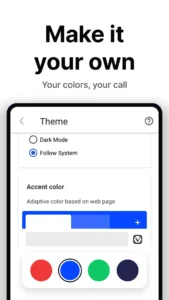
- Customizable browsing experience with various blocking levels and themes.
- Desktop-class features like extensions, Tab Stacks, and a PDF reader.
- Fast page loading due to ad and tracker removal.
- Syncs data (bookmarks, notes, passwords) across devices with end-to-end encryption.
Limitations:
- The app’s file size is 342.0 MB, which is larger than some other browsers.
- Requires Android 10 or higher, which might exclude older devices.
- The app requests a wide range of permissions, though these are for comprehensive functionality.
- Some links within Vivaldi are affiliate links, and the developer may earn compensation from purchases made through them.
Who Should Install Vivaldi Browser?
This app is ideal for users who prioritize privacy, security, and a customizable browsing experience. If you are tired of ads and trackers, or if you want a free VPN for your browsing, Vivaldi Browser: Fast, Private is a strong choice. It suits users who appreciate advanced features typically found on desktop browsers, such as extensions and robust tab management, on their mobile device.
Who Should Skip Vivaldi Browser?
Users with very limited storage on older Android devices (below Android 10) might find the app’s size or compatibility requirements challenging. If you prefer a very minimalist browser with fewer features and permissions, or if you are not concerned about privacy settings, other lighter options might be more suitable.
Frequently Asked Questions
Is Vivaldi Browser: Fast, Private free to use?
Yes, the Vivaldi Browser APK is completely free to download and use. It includes a free built-in VPN service with a Vivaldi account.
What is the latest version of Vivaldi Browser?
The latest available version is 8.3.4192.96.
What Android version does Vivaldi Browser require?
It requires Android 10 or a newer version to operate.
Does Vivaldi Browser include a VPN?
Yes, it has a built-in VPN that is free to use with your Vivaldi account. It encrypts your browsing connection within the app.
