


Claude Duet 1.261119.17
Anthropic PBC
November 22, 2026
55.0 MB
1.261119.17
com.anthropic.aibo
RELATED APPS






SCREENSHOTS


DESCRIPTION
Getting Started with the Claude Duet APK
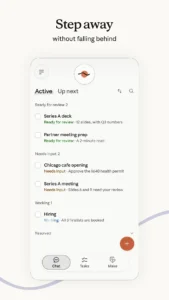
Claude Duet is an intelligent productivity assistant developed by Anthropic PBC. It acts as a bridge between your communication tools and your daily tasks, aiming to help you manage your digital workspace. By connecting to your existing accounts, this Claude Duet APK monitors your schedule and communications to highlight what requires immediate attention. It is a powerful tool for professionals who need to stay organized throughout the day.
The app functions by scanning your calendar and emails each morning. It provides context for incoming requests and prepares drafts for your review. Throughout the day, the AI checks your connected accounts to identify items that have gone quiet, such as unaddressed client emails. This allows Claude Duet to function as a proactive layer between you and your busy inbox.
Key Features of the AI Assistant
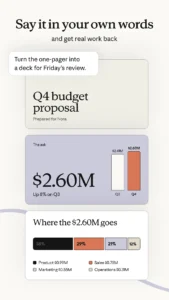
The core utility of Claude Duet lies in its ability to handle multi-step tasks across different platforms. You can describe a job in a message, and the assistant will determine which connected applications to use to complete it. Whether you need a financial model, a slide deck, or a market brief, the app works in the background and notifies you when tasks are finished or require your approval. This is similar to how you might manage remote collaboration in tools like Google Meet for your video meetings.
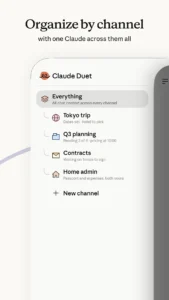
The platform relies on your existing Claude account, including your established memory and skills. You can expand these capabilities by choosing from over 6,000 plugins and connectors available in the Claude Marketplace. To keep your work organized, you can sort different projects into specific channels. The AI reads across these channels to maintain a complete picture of your ongoing tasks, ensuring that your data stays synchronized. If you need to manage your documents alongside these tasks, you might also consider using MediaFire for cloud storage and file organization.
Installation and System Permissions
Before you install the Claude Duet APK, ensure you have received an email confirming your access. The app is currently available via a waitlist for Claude Pro and Max subscribers in the US. Upon installation, the app requests several permissions to function. These include:
- Calendar access to read your schedule.
- Microphone access for voice input.
- Location permissions to provide contextual data.
- Biometric access for secure authentication.
- Internet access to sync with your accounts.
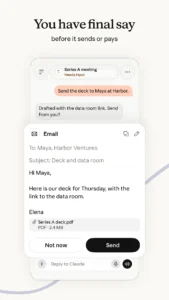
You always maintain control over the process. The assistant will not send, post, pay, or delete anything without your explicit approval. You can disconnect any integrated app at any time through the settings menu.
Quick Facts
Strengths and Limitations
- Strengths: Automates email drafting and task management; integrates with thousands of plugins; allows you to set specific work channels.
- Limitations: Requires a waitlist invitation; currently limited to US Pro and Max subscribers; can make mistakes regarding task urgency.
Who Should Use This App
This application is designed for professionals who manage heavy communication loads and need an AI to filter incoming requests. It is ideal for those already invested in the Claude ecosystem. However, if you are looking for assistance with personal errands, you may find the tool less helpful, as it is optimized primarily for workplace productivity. Always review the content the AI presents before approving actions, as it can occasionally misinterpret the priority of your messages.
Is Claude Duet free to download?
Yes, the app is free to download, but it requires a Claude Pro or Max subscription to function.
Can I use the app offline?
No, the app relies on an active internet connection to sync with your email, calendar, and other connected services.
How do I join the waitlist?
You can join the waitlist by visiting the official claude.com/claude-duet website.
