


Countdown Days App & Widget 10.7
Glad Appvestor
November 22, 2026
54.7 MB
10.7
Android 10
smsr.com.cw
RELATED APPS




SCREENSHOTS
DESCRIPTION
Getting Started with Countdown Days App & Widget APK
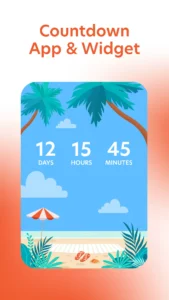
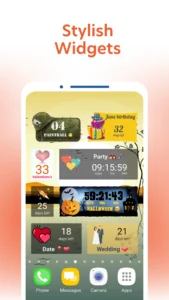
Setting up Countdown Days App & Widget is a precise process designed to keep your schedule organized. To add a countdown to your home screen, access your phone’s widget menu and locate the application. Long-press on one of the four available resizable widget sizes—1×1, 2×1, 3×1, or 4×3—and drag it onto your screen. A configuration dialog will appear, allowing you to select an existing event or create a new one by entering a title and date. This makes Countdown Days App & Widget APK a highly accessible tool for tracking your time, whether you are counting down to a vacation, retirement, or a holiday.
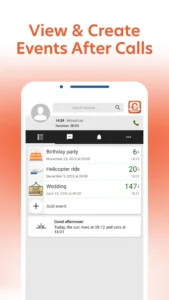
This application requires several permissions to function, including access to phone states and call management. These are necessary to provide the unique after-call calendar view, which helps you identify incoming calls and immediately manage your event countdowns. The app also uses foreground services to ensure the overlay widget displays without latency after a call ends. By granting these permissions, you allow the app to bridge the gap between your phone conversations and your personal planning. You can find more inspiration for your lifestyle planning on Pinterest.
Core Features for Tracking Important Dates
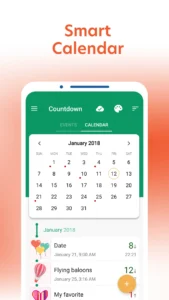
Countdown Days App & Widget provides a comprehensive way to monitor your time. You can track days, hours, and minutes until weddings, birthdays, holidays, or any special occasion. The app supports both countdowns to future events and count-up timers for dates that have already passed. This ensures that you can monitor milestones like a baby due date or the time since a retirement date with equal ease. If you prefer to document your daily life, consider using My Diary – Daily Diary Journal.
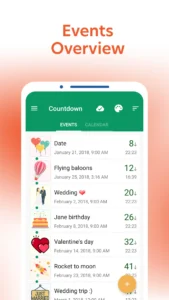
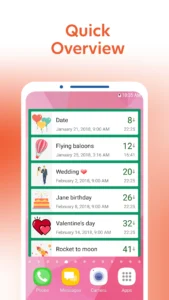
Users can customize their experience with a large collection of stickers and the option to use personal photos for their widgets. The app also includes a resizable list widget that displays all your tracked dates in a single location on your home screen, so there is no need to enter the application to see your upcoming events. For recurring events, you can set daily, weekly, bi-weekly, monthly, or yearly reminders to ensure you never miss a deadline or anniversary. The Countdown Days App & Widget APK also includes backup and restore functionality to keep your data safe, ensuring your important event list is preserved.
Strengths and Limitations
Strengths:
- Multiple resizable widget sizes for home screen customization.
- Built-in after-call feature for instant event management.
- Flexible repetition options for recurring events.
- Ability to use personal photos and stickers for a unique look.
- Included count-up feature for tracking days passed since an event.
- Backup and restore options for your event data.
- Large collection of stock images for event styling.
Limitations:
- The app includes advertisements.
- Requires extensive permissions to manage call states and overlay displays.
- The installation file is 54.7 MB, which may be significant for some devices.
Who Should Install This App?
This tool is ideal for individuals who want a visual reminder of upcoming events directly on their home screen. It is particularly useful for those who manage many social or professional commitments and want to utilize their phone’s call screen to quickly add or view these events. If you prefer a minimalist interface without call-related features, this might not be the right choice for you. However, for anyone needing a reliable Countdown Days App & Widget APK to manage birthdays, work meetings, or special holidays, this application offers a robust set of features to keep you on track.
Frequently Asked Questions
Is Countdown Days App & Widget free?
Yes, the app is free to use, though it is supported by advertisements.
Does it work offline?
The core countdown and widget functionality does not require an active internet connection to display your saved events.
Can I track events that have already passed?
Yes, the app features a count-up function that allows you to track the time elapsed since a specific date.
