

Google Home 4.38.26.0
Google LLC
November 22, 2026
77.7 MB
4.38.26.0
com.google.android.apps.chromecast.app
RELATED APPS





SCREENSHOTS
DESCRIPTION
Control Your Connected Home with Google Home APK
If you own smart home devices, the Google Home app serves as the central hub for your living space. Developed by Google Commerce Ltd, this application allows you to monitor, organize, and control your compatible hardware from a single interface. It is designed to help you integrate Gemini for Home technology into your daily routine. By using the Google Home APK, you gain a unified way to interact with your surroundings.
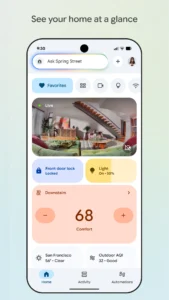
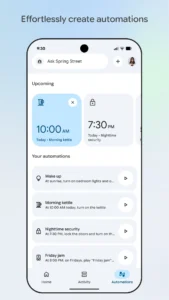
The app provides a clear overview of your home status. You can group devices into specific dashboards, which makes navigating your settings much faster. Whether you want to check your camera history or adjust your smart lighting, the streamlined design helps you find what you need without searching through complex menus. The Google Home APK also allows you to stay updated on home activity even when you are away. This visibility ensures that you always know what is happening inside your house.
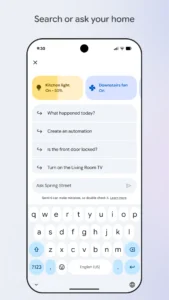
One of the primary benefits is the integration of Gemini for Home, which changes how you interact with your devices. Instead of tapping through multiple screens, you can simply ask your home to perform specific tasks. This voice-based control makes it easier to manage complex routines across your entire household. If you are looking for entertainment during your downtime, you might enjoy Poker Heat™ Texas Holdem Poker, which offers a different kind of digital interaction.
Scanning Camera Events and Device Management
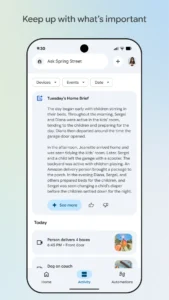
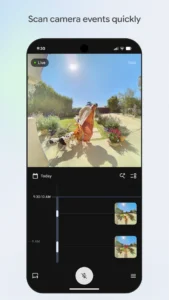
The Google Home app simplifies security monitoring by providing a dedicated interface for camera live views and event history. You can scan through captured events quickly to see what happened at your property. This feature is particularly useful for verifying notifications or checking in on your home in real-time. With the Google Home APK, viewing your security feeds becomes a reliable part of your day. The app is built to handle multiple video streams, allowing you to monitor different rooms or entry points simultaneously without hassle.
Setting Up Your Smart Home
To get started, you simply download the Google Home APK and sign in with your Google account. The app requires several permissions to function correctly, including access to your camera for video feeds, microphone access for voice commands, and location services to detect your proximity to your home network. It also uses Bluetooth to scan and connect to nearby smart devices during the initial setup process. Other permissions like contact access, storage access for saving logs, and network state monitoring help the app maintain a constant, secure link to your hardware. The app also requests background location and foreground service permissions to ensure your home automations trigger accurately even when the app is not actively open on your screen.
Another popular title for your Android device is Pusoy Dos ZingPlay – card game, which provides a classic card gaming experience. While that app focuses on entertainment, the Google Home app remains focused on utility and automation for your household needs. Whether you are adding a new light or checking a doorbell feed, the process is designed to be accessible for all users, keeping your home management tasks organized and efficient.
Quick Facts
Strengths and Limitations
- Strengths: Centralized dashboard for all smart devices, intuitive camera history interface, and advanced voice control via Gemini.
- Limitations: Requires a large number of system permissions, some features are region-restricted, and it requires compatible smart hardware to function.
Frequently Asked Questions
Is Google Home free to use?
Yes, the app is free to download and use.
Does it work offline?
No, the app requires an active internet connection to control your smart devices and access camera feeds.
Which Android version do I need?
The developer does not specify a minimum Android version, but the app is compatible with most modern Android devices.
