


XBOX Family Settings 20261024.261024.1
Microsoft Corporation
November 22, 2026
60.9 MB
20261024.261024.1
Android 7.0
com.microsoft.xboxfamily
RELATED APPS






SCREENSHOTS



DESCRIPTION
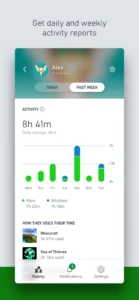
If you are a parent looking for more control over gaming time, XBOX Family Settings helps you manage your household activity directly from your phone. Developed by Microsoft Corporation, this application provides a central hub to oversee what your children play and how long they spend on their console. You can adjust settings in real time to ensure the gaming environment stays appropriate for your family.
Understanding XBOX Family Settings
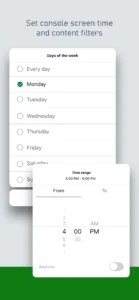
The XBOX Family Settings app simplifies the process of adding children to your family account. Once connected, you gain access to several administrative tools that help you monitor daily habits. You can set specific screen time limits to encourage balance, and update content restrictions based on age appropriateness. The app also allows you to stay informed about incoming friend requests, giving you the final say on who your child interacts with while they play.
You might also find use for other Microsoft tools to keep your digital life organized, such as Bing: Chat with AI & GPT-4 for your search needs. When you are browsing, you can manage your online experience with Microsoft Edge on your Android device. These applications work well alongside your console management tools to provide a cohesive experience across the Microsoft ecosystem.
Getting Started and Permissions
To begin, download the XBOX Family Settings APK and ensure your device runs Android 7.0 or higher. Upon installation, the app requests several permissions to function correctly. It requires access to your camera, microphone, and external storage to facilitate account management and notifications. It also uses biometric and fingerprint sensors to secure your administrative access. Because the app relies on internet connectivity to sync your settings with the console, it will access your network and Wi-Fi state frequently.
Quick Facts
Strengths and Limitations
Strengths:
- Provides real-time monitoring of console activity.
- Allows parents to set screen time limits easily.
- Helps manage friend requests and content restrictions.
- The application is free to download and use.
Limitations:
- Requires a Microsoft family account to function.
- Requests a wide range of device permissions.
Who Should Use This App
This application is ideal for parents who own an XBOX console and want a mobile-first approach to managing their child’s playtime. If you prefer to handle gaming restrictions without needing to be in front of the console, this tool is designed for you. Users who do not have an XBOX or do not wish to manage accounts through Microsoft services should skip this app.
Frequently Asked Questions
Is XBOX Family Settings free?
Yes, the app is free to download and use for managing your family account.
Does it work offline?
No, the app requires an active internet connection to sync your settings and updates with the console in real time.
Which Android version is required?
You need a device running Android 7.0 or higher to install the latest version.
