


Debug Dispatch 1.1.4
Google LLC
November 22, 2026
59.6 MB
1.1.4
Android 7.0
com.google.android.apps.debugdispatch
RELATED APPS






SCREENSHOTS

DESCRIPTION
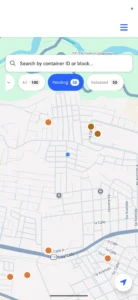
Do you need a reliable way to coordinate and track field-based mosquito release operations? Debug Dispatch is a specialized application developed by Google Commerce Ltd to assist with vector control initiatives. This tool is built to help both internal staff and external partners manage their fieldwork through real-time mapping and data logging capabilities, and you can obtain the Debug Dispatch APK today to start your project. This software is designed to assist professionals who require accurate data collection in the field.
How Does Debug Dispatch APK Help Field Teams?
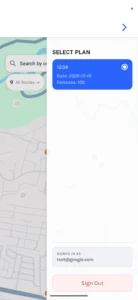
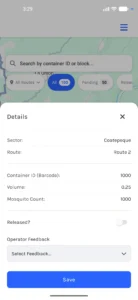
The core function of the Debug Dispatch app is to provide a structured environment for environmental health operations. By allowing users to map specific release areas, the app ensures that deployment data is captured accurately while the work is happening in the field. When you use the Debug Dispatch APK, this real-time logging helps teams stay organized and ensures that every participant has access to the latest operational information during active missions.
The software includes features that allow for the coordination of complex field efforts. If you are managing multiple teams, you might also find utility in Google Meet for your daily project briefings. For those who need to manage large sets of project documents or data logs, the MediaFire platform offers a way to keep your files backed up and accessible from any device.
Getting Started With the Application
To begin using Debug Dispatch, download the latest file and follow the on-screen installation prompts. Because this app handles sensitive location and field data, it requires several permissions to function correctly. The app needs access to your coarse and fine location to map release zones accurately, and it uses your camera for visual documentation. Other permissions, such as network state, internet access, and wake locks, ensure the app remains connected and active during your shifts.
Security is also integrated into the design. The app requests access to your biometric and fingerprint hardware to help protect the information stored on your device. It also utilizes foreground services and system alert windows to provide you with timely notifications while you are working.
Strengths and Limitations
Strengths
- Provides real-time mapping for specific field operations.
- Includes tools for logging deployment data on the go.
- Supports coordination between internal staff and external partners.
Limitations
- Requires a wide range of permissions to operate effectively.
- Designed for a very specific use case in vector control.
Who Should Use This App?
This application is intended for professionals and partners involved in mosquito release and vector control programs. It is not a general-purpose productivity tool but rather a specialized utility. If your work involves mapping release areas and logging field data, this software will assist you in your daily tasks. If you are not part of these specific initiatives, you will not find the features necessary for your daily activities.
Is Debug Dispatch free to use?
Yes, the app is free to download and use.
Does it work offline?
The app relies on internet access and network state permissions to function, which suggests it is designed for environments where connectivity is available for real-time logging.
What is the latest version available?
The current version is 1.1.4, which includes performance improvements and bug fixes.
