


WPS Teams 5.55.0
WPS SOFTWARE PTE. LTD.
November 23, 2026
323.7 MB
5.55.0
Android 5.0
com.wps.teams
RELATED APPS






SCREENSHOTS

DESCRIPTION
What is the WPS Teams APK?
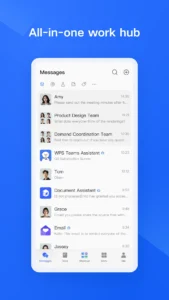
Are you looking for a single workspace that combines chat with document creation? The WPS Teams APK is an all-in-one communication and collaboration platform designed to keep your office tasks organized. Developed by WPS SOFTWARE PTE. LTD., this app integrates messaging, file management, and project scheduling into one interface to help teams stay connected from any device. Whether you are in the office or working remotely, this tool aims to centralize your professional workflow. By combining chat with document management, you can keep your team aligned without switching between multiple apps.
How does it improve your workflow?
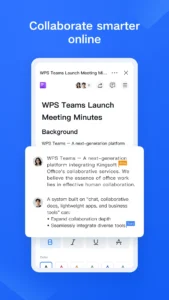
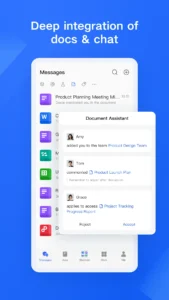
The app centers on deep integration between your conversations and your work files. You can create text documents, spreadsheets, forms, and presentations directly within the app. Because it supports real-time collaboration, you and your team members can co-edit files simultaneously. If you need to discuss specific parts of a file, you can use the document conversation panel or add comments that notify your team immediately. This keeps all feedback linked to the project files rather than buried in separate email threads. Content is auto-saved as you write, ensuring your progress is never lost.
Communication features include group announcements and urgent messaging to ensure important information is seen. You can also use personal notes to save your own tasks or insights and save chat history to notes. For those who need to back up files for easy access, you might also consider using MediaFire as a supplementary tool for your document organization. The platform also includes a corporate directory, so you can quickly import your organizational structure and find your colleagues instantly. Global search allows you to retrieve contacts, group chats, and old messages to find information quickly.
Integrated Tools for Productivity
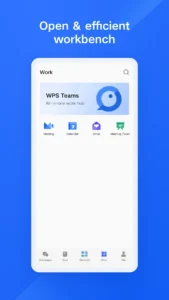
WPS Teams goes beyond simple messaging by offering a suite of professional tools. You can host or join meetings directly from your chat window, which includes HD video calls and real-time document sharing during the session. The app also features a built-in calendar to manage both personal and team schedules, making it easy to track deadlines. If you prioritize high levels of data privacy for your files, you may also want to look into Proton Drive: Cloud Storage for secure storage options. The app provides a central document hub where you can manage both personal and enterprise files with clear separation, recent history, shared lists, and starred documents.
Getting started with the app
To use the WPS Teams APK, download the installation file and ensure your Android device meets the minimum requirements. The app requires several permissions to function effectively. It needs access to your camera and microphone for video meetings, your contacts to manage the enterprise directory, and your storage to handle document uploads and downloads. It also requests location, Bluetooth, and network state permissions to support various hardware connectivity and sync features. Once installed, you can sync your chat history across your PC, mobile, and tablet in real time. The app also uses biometrics and fingerprint permissions to help secure your account information.
Quick Facts
Strengths and Limitations
Strengths:
- All-in-one platform for messaging and document editing.
- Real-time co-editing and document-linked comments.
- Cross-device synchronization for chats and files.
- Professional meeting tools with HD video capabilities.
Limitations:
- Requires a wide range of permissions, including camera, microphone, and location.
- The app file size is significant at over 323 MB.
Frequently Asked Questions
Is WPS Teams free to use?
Yes, WPS Teams is a free application.
Does this app work offline?
While the app is designed for communication and cloud-based collaboration, it includes personal note-taking capabilities that can help manage tasks when you are not actively connected.
Which Android version do I need?
You need a device running Android 5.0 or higher to install this application.
