


Gemini Notebook 1.67.7.1023237852
Google LLC
November 22, 2026
54.0 MB
1.67.7.1023237852
com.google.android.apps.labs.language.tailwind
RELATED APPS






SCREENSHOTS


DESCRIPTION
Getting Started with Gemini Notebook APK
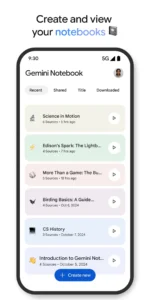
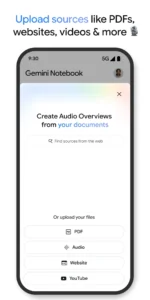
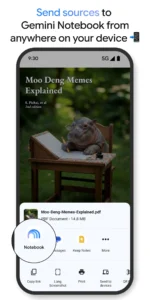
Gemini Notebook serves as an intelligent assistant designed to simplify complex information for students, creators, and professionals. Developed by Google Commerce Ltd, this application allows you to centralize your research by uploading PDFs, websites, YouTube videos, and text files into dedicated digital notebooks. You can get started by installing the app and signing in to your account, which enables the system to sync your data across devices. The app is built to handle the heavy lifting of processing large amounts of data so you can focus on absorbing the most important insights.
To function correctly, the app requests several permissions. It uses your camera and microphone for input, manages your accounts for synchronization, and accesses your network state and internet connection to fetch data from your sources. The Gemini Notebook APK also utilizes foreground services for media playback, ensuring you can listen to audio content even when the app is running in the background. It also requires access to your media files for user-selected content and uses wake locks to maintain performance during long processing tasks.
Key Features for Better Productivity
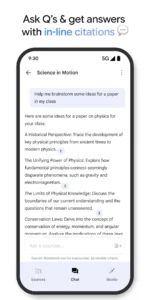
The primary strength of this tool is its ability to act as an expert on your uploaded files. Once your content is added, the AI summarizes the material and highlights interesting connections between different sources. You receive answers to your specific questions, and every response includes in-line citations to ensure you can verify the information directly from your original documents. If you need to manage your professional tasks alongside your research, you might also find the Google Meet tool helpful for your communication needs.
Another unique feature is the transformation of long text blocks into podcast-style audio discussions. Two AI hosts engage in a conversation about your material, which you can listen to on the go. You are not just a passive listener, as you can join the discussion to steer the conversation or ask follow-up questions. If you require a secure place to store these source files before adding them to your notebooks, consider using MediaFire to manage your document backups.
Quick Facts
Strengths and Limitations
Strengths:
- Trusted insights with in-line citations for all summaries.
- Flexible learning options including text-to-audio podcast conversion.
- Support for diverse media types like YouTube videos and websites.
- Active development with regular performance improvements and site viewing support.
Limitations:
- Requires an active internet connection for many core AI features.
- Extensive permission requests, including microphone and camera access.
- The app relies on a user account for full functionality.
Who Should Install Gemini Notebook
This app is ideal for researchers, students, and professionals who handle high volumes of complex information daily. It is particularly useful if you prefer listening to information rather than reading long documents. The ability to turn standard text into a conversational audio format is a major benefit for those with busy schedules. However, if you are concerned about the number of permissions required or prefer to work entirely offline without cloud-based AI processing, you may want to skip this installation.
Frequently Asked Questions
Is Gemini Notebook free to use?
Yes, the app is free to download and use for all users.
Can I listen to audio overviews offline?
Yes, the app supports background playback and offline support for your audio overviews, allowing you to learn on the go.
What sources can I upload to the app?
You can upload PDFs, websites, YouTube videos, and general text files into your notebooks for the AI to analyze.
