

Google Gemini 1.0.995038376
Google LLC
November 22, 2026
5.1 MB
1.0.995038376
Android 9
com.google.android.apps.bard
RELATED APPS






SCREENSHOTS
DESCRIPTION
Do you find it difficult to manage complex tasks or generate creative content on your phone? Google Gemini is an AI-powered assistant designed to help you solve multi-step workflows, write code, and analyze data directly from your device. Developed by Google Commerce Ltd, this application acts as a proactive tool to simplify your daily digital life, whether you are studying, working, or brainstorming new ideas. It transforms how you interact with your phone by providing intelligent, context-aware responses that go beyond standard search results. This application is built to handle everything from morning commutes to late-night deep research sessions.
Understanding the Google Gemini APK Features
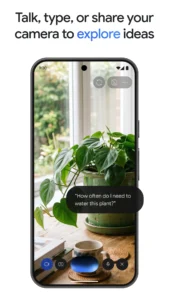
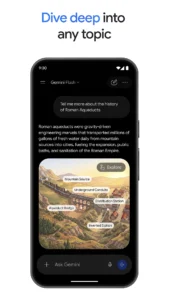
The app offers several advanced capabilities to boost your productivity. With the introduction of the Gemini 4 Argon model, you can tackle intricate problems that require advanced reasoning. If you are a developer or data enthusiast, you can use the assistant to write, debug, and execute code or analyze complex data sets in seconds. Google Gemini also allows you to upload documents, spreadsheets, and photos to receive instant summaries and insights. You can even interact in real time using Gemini Live, which lets you brainstorm or share your camera view to discuss exactly what you see. The app moves beyond simple chat walls by providing carefully crafted responses that include interleaved images, timelines, and interactive visuals.
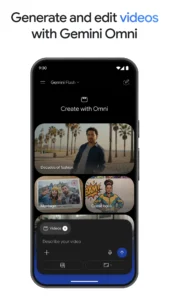
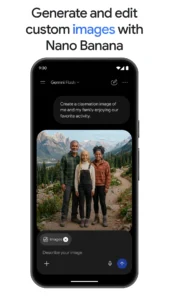
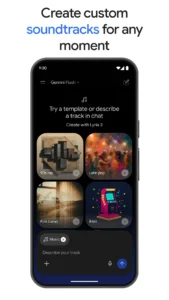
For creative projects, you can use Nano Banana 2 to generate and edit photos with specific camera and lighting controls. If you need to collaborate, you might also consider Google Meet for your professional video conferencing needs. The assistant integrates with your existing Google apps, such as Gmail, Calendar, and YouTube, providing personalized help based on your own content. You can even create custom soundtracks using Lyria 3 or turn your study files into podcast-style overviews to listen to while you are on the move. By turning a simple prompt into a prototype, you can build web pages, games, or dashboards without needing advanced technical skills.
- Creative Capabilities: Generate cinematic videos, design posters with sharp text, and build diagrams using the latest AI models.
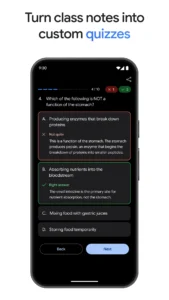
- Learning Support: Upload class notes to generate custom practice quizzes and interactive visuals for easier exam preparation.
- Proactive Assistance: Get deeper, more relevant responses grounded in the sources you provide within your notebook.
Getting started with the app is easy. After you download and install the Google Gemini APK, the app will request specific permissions to function correctly. It requires access to your network state to retrieve information, the ability to check package sizes, and wake lock permissions to keep the assistant active while processing your requests. Please note that opting in will replace your current Google Assistant as the primary voice interface on your phone, though you can switch back in the settings menu if you prefer. Some features previously available in Google Assistant might not be present in the new interface yet.
If you need a reliable way to store the files you analyze, you can explore MediaFire as a companion tool for your productivity workflow. The core experience is free to use, though you can choose to upgrade to AI Plus, Pro, or Ultra plans for access to more complex tasks and higher-tier models like Gemini Omni. Whether you want to turn a rough concept into a polished project or simply manage your daily schedule, this assistant is designed to handle the heavy lifting for you.
Strengths and Limitations
- Strengths: Highly capable multi-step reasoning, deep integration with Google services, and advanced creative tools for images and audio.
- Limitations: Requires replacing your default Google Assistant, some older voice features are not yet available, and advanced tiers require a paid upgrade.
Who Should Use This App?
This app is ideal for students, professionals, and creatives who want to leverage AI for complex reasoning and content creation. If you rely heavily on Google Workspace apps, this tool offers significant advantages. However, users who prefer the legacy Google Assistant features or those who do not want to use an AI-centric interface might prefer to stick with the standard assistant settings.
Frequently Asked Questions
Is Google Gemini free to download?
Yes, the app is free to use. You can access many powerful features without cost, though specific advanced plans are available for users who need more capacity.
Does this app work offline?
No, the assistant requires an active network connection to process your prompts and retrieve information from Google’s models.
Which Android version is required?
The app is compatible with a wide range of devices, though you should ensure your system is updated to support the latest version of the Google app ecosystem.
APP TRAILER
