


Microsoft Identity Pass 1.8.21
Microsoft Corporation
November 22, 2026
129.7 MB
1.8.21
Android 8.1
com.identitypassmobile
RELATED APPS






SCREENSHOTS
DESCRIPTION
How does the Microsoft Identity Pass APK manage your access requests?
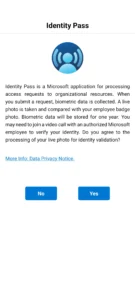
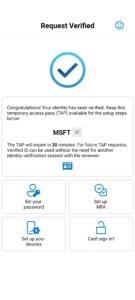
Microsoft Identity Pass is an official application from Microsoft Corporation designed to streamline the process of submitting and managing access requests for organizational resources. If you are an employee who needs to verify your identity to access secure company assets, this tool handles the necessary data collection and authentication steps directly from your mobile device. By downloading the Microsoft Identity Pass APK, you gain a secure portal that connects your physical identity to your digital work profile through biometric verification and live photo comparison.
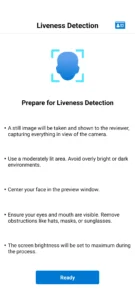
When you initiate a request, the app utilizes biometric data to confirm your identity. It captures a live photo which is then compared against your official employee badge photo. In some instances, the verification process may require you to join a live video call with an authorized Microsoft employee. For those who frequently participate in virtual meetings, you might also find tools like Google Meet useful for your professional communication needs.
Key features for identity verification
The application is built to handle sensitive verification tasks with specific functional requirements. By using Microsoft Identity Pass, you gain a dedicated interface for submitting requests and tracking their status. The app requires access to your camera to take the necessary live photos for biometric comparison. It also manages audio settings and microphone permissions, which are essential if your verification process involves a live video call. The system is designed to store your biometric data for one year to facilitate consistent verification cycles across your organization.
To ensure you do not miss important updates, the app relies on push notifications. If you keep notifications enabled, you receive real-time alerts regarding the status of your access requests. If you choose to disable notifications, you must rely on links sent to your Microsoft work account or personal email address. It is important to note that these links must be opened on the same device where you initiated the request to ensure the process completes successfully. Utilizing the Microsoft Identity Pass APK correctly ensures that your credentials remain valid for the resources you need.
Getting started with the app
To begin using Microsoft Identity Pass, ensure your device runs Android 8.1 or higher. The installation involves granting several permissions, including access to your location, camera, microphone, and storage. These permissions are necessary for the app to perform biometric checks, manage video calls, and handle file operations. You may also want to explore other productivity tools like Bing: Chat with AI & GPT-4 to assist with your daily information retrieval tasks. The app also uses background services to keep the authentication process active during your session.
Quick facts about the application
Strengths and limitations
Strengths:
- Official Microsoft application for secure resource access.
- Integrated biometric verification using live photos.
- Direct support for video calls to confirm identity.
- Helps maintain organizational security standards.
Limitations:
- Requires extensive device permissions, including camera and microphone access.
- Biometric data is stored for one year.
- Verification may require manual interaction via email if push notifications are disabled.
- The app is not suitable for users who do not have an associated Microsoft work account.
Frequently asked questions
Is Microsoft Identity Pass free to use?
Yes, the app is free to download and use for authorized employees requiring access to organizational resources.
Does the app work without an internet connection?
No, the app requires an active internet connection to submit requests, verify biometric data, and communicate with Microsoft servers.
Which Android version is required?
You need a device running Android 8.1 or higher to install the latest version of Microsoft Identity Pass.
