


Microsoft Intune 2026.11.03
Microsoft Corporation
November 22, 2026
143.3 MB
2026.11.03
Android 8.0
com.microsoft.intune
RELATED APPS






SCREENSHOTS

DESCRIPTION
Managing Your Enterprise Access with Microsoft Intune
Microsoft Intune is a business tool designed to help employees connect securely to their organization’s resources. Developed by Microsoft Corporation, this application acts as a bridge between your personal mobile device and the corporate network. It is primarily used by companies to ensure that employees can access internal documents and applications while keeping organizational data secure.
When you use Microsoft Intune, you are setting up a managed environment. The app allows your IT department to define security policies that protect company information. You can use it to register your device, which often grants you access to email, business apps, and internal websites that would otherwise remain private.
Key Features for Business Productivity
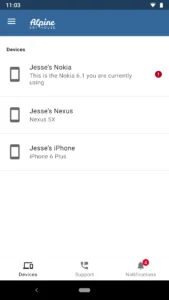
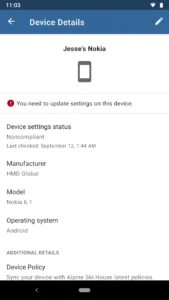
The core functionality of the app centers on device management and resource access. You can use Microsoft Intune to verify that your device meets the security standards required by your employer. This includes checking for compliance before you are allowed to open company-managed applications.
Another feature is the ability to manage your device’s access settings directly. If you lose your phone or switch devices, the app provides tools to help you stay productive without compromising security. It also serves as a communication channel for your IT support team to send you important updates regarding your device status. If you are looking for other business solutions, you might check out Kyte: POS, Online Store & Catalog for retail management.
Getting Started and Permissions
To use this app, your organization must already have a subscription to the service. Your IT administrator must provide you with an account and specific instructions on how to enroll your device. Once installed, the application requires several permissions to function correctly. It requests access to your location, camera, and network state to verify device compliance. It also utilizes biometric and credential permissions to ensure that only you can access your work profile.
Because this app manages sensitive enterprise data, it requires administrative privileges on your device. This includes the ability to manage accounts and perform security checks. If you need to search for work-related information using advanced tools, you may also find Bing: Chat with AI & GPT-4 useful for your daily tasks.
Quick Facts
Strengths and Limitations
Strengths:
- Provides secure access to enterprise resources.
- Helps maintain device compliance with company policies.
- Directly integrates with organizational IT support systems.
Limitations:
- Requires an existing organizational subscription.
- Extensive permission requirements may concern privacy-focused users.
- Functionality is restricted in certain countries.
Who Should Use This App
You should install Microsoft Intune if your company requires you to use it for work-related tasks on your Android device. It is designed specifically for employees who need to access corporate email or internal business apps. You should skip this app if you are not directed to use it by your IT department, as it provides no personal utility without a corporate account.
Frequently Asked Questions
Is Microsoft Intune free to download?
Yes, the app is free to download, but it requires an active subscription from your organization to function.
Does this app work offline?
Some features may work offline, but you generally need an internet connection to sync policies and access corporate resources.
Which Android version is required?
You need Android 8.0 or higher to install and run the application.
