


Microsoft Planner 1.18.40
Microsoft Corporation
November 22, 2026
34.3 MB
1.18.40
Android 7.0
com.microsoft.planner
RELATED APPS






SCREENSHOTS
DESCRIPTION
Work Smarter with Microsoft Planner APK
Microsoft Planner is designed specifically for teams using Office 365 work or school subscriptions. Developed by Microsoft Corporation, this productivity tool provides a visual interface to manage projects, assign tasks, and keep your team aligned on deadlines. If your organization relies on Microsoft services, this app helps you track deliverables without leaving your mobile device. It is a dedicated space for professional collaboration, ensuring that every member of your team knows exactly what needs to be done and when.
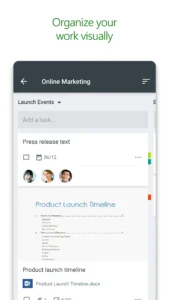
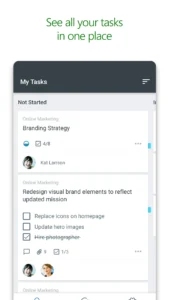
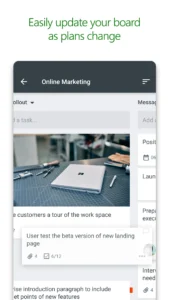
When you download the Microsoft Planner APK, you get a central hub for all your group tasks. You can build individual boards for different plans and use buckets to categorize work. Moving tasks between columns is as simple as a drag-and-drop action, making it easy to update statuses or reassign duties as project needs change. The My Tasks view gives you a personal summary of everything assigned to you across all your active plans. This feature ensures you never miss a deadline by consolidating your responsibilities into one clear, easy-to-read list that updates in real time.
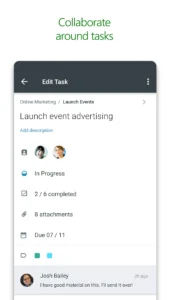
Collaboration is a major focus of Microsoft Planner. You can attach photos directly to tasks and hold discussions within the app, which keeps project details consolidated in one place instead of scattered across emails or chat logs. Because the app syncs across all your devices, you can update your progress from your desk or while traveling. If you need to coordinate with colleagues, you might also find Google Meet helpful for your video conferencing requirements, or use Bing: Chat with AI & GPT-4 to assist with your research and planning tasks. By keeping discussions attached to the specific deliverables, the app ensures that context is never lost, even when team members change.
To get started, install the app and sign in with your eligible Office 365 work or school account. The app requires several permissions to function, including access to your camera for attaching photos, network state for syncing data, and notifications to keep you updated on progress. It also uses accounts and credentials to ensure you are logged into the correct organizational profile, while NFC and phone state permissions help with device integration and security verification. Please note that the app requires these permissions to maintain the high level of security expected by enterprise environments.
Quick Facts
Strengths and Limitations
Strengths:
- Visual board layout makes project tracking intuitive.
- Drag-and-drop interface for fast status updates.
- Consolidated communication keeps team discussions attached to specific tasks.
- Full synchronization across mobile and desktop environments.
Limitations:
- Requires an eligible Office 365 work or school subscription.
- Does not support personal accounts like Outlook.com or Hotmail.com.
- Requires multiple device permissions, including camera and account management.
Who Should Use This App
This tool is ideal for project managers, team leads, and employees who already use the Microsoft 365 ecosystem for their professional tasks. If your company uses Planner, this mobile version is essential for staying productive while away from your computer. If you do not have an eligible work or school subscription, you should skip this installation as it will not function with personal email accounts.
Is Microsoft Planner free to use?
The app is free to download, but it requires an eligible Office 365 work or school subscription to function. It is not designed for personal consumer accounts.
Does it work offline?
The app is designed to sync with your organization’s server. While you can view some data, it requires an active internet connection to update tasks and participate in team discussions effectively.
Which Android version is required?
You need a device running Android 7.0 or higher to install and run the latest version of the application.
