


Power Apps Mobile Preview 1.261006.02
Microsoft Corporation
November 22, 2026
90.4 MB
1.261006.02
Android 7.0
com.microsoft.PreviewApp
RELATED APPS






SCREENSHOTS
DESCRIPTION
How can developers test React Native Power Apps on real hardware?
If you are building custom mobile experiences for the Power Apps platform, you likely need a way to verify your work without constant store submissions. Power Apps Mobile Preview acts as a dedicated host for your in-development bundles. By allowing you to stream your code directly from a local Metro bundler to your phone, it removes the need to rebuild or resign your application during the iteration process.
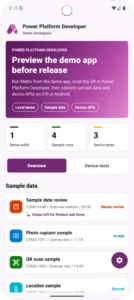
This developer companion app is designed for makers, engineers, and partners who need to see how their layouts and components perform on a real mobile device. Power Apps Mobile Preview ensures that you can catch UI errors or connector issues early in the development lifecycle. It functions as a sandbox that mirrors the production runtime, providing an accurate look at your application before it reaches your users.
Core features for rapid development
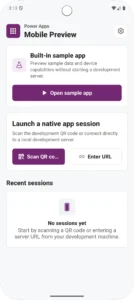
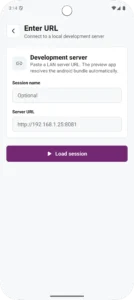
The app offers several tools to streamline your testing workflow. You can scan a QR code from your local server to load your JS bundle instantly, or manually enter a dev-server URL if you are working over a tunnel or a restricted network. Once connected, the app supports Fast Refresh, meaning your code changes appear on your device shortly after you save them in your editor.
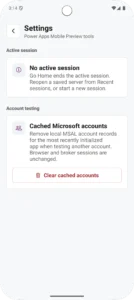
For authentication, the app uses Microsoft Entra ID, allowing you to sign in with your work or school account. This provides the necessary tokens for testing Dataverse, Microsoft Graph, and custom connectors. You can also use the diagnostic overlay to view runtime versions, JS errors, and red-box stacks, which helps you identify problems during your testing sessions. If you are looking for other utilities, you might also like ZArchiver Pro Donate for file management or Minecraft Java: PojavLauncher to run Java games on your device.
Getting started with your device
To begin, ensure your Android device is running version 7.0 or higher. You will need to grant several permissions for full functionality, including Camera access for scanning QR codes, as well as Location and Audio permissions if your app uses those specific native modules. The app also requests network access to communicate with your local dev server and file system permissions to handle data bundles.
Simply install Power Apps Mobile Preview and confirm your device is on the same network as your development machine. If you are not on the same network, you can use a tunnel service to provide a public URL for the app to reach. Remember that this tool is for development purposes only; you should use the standard Power Apps client for your production workloads.
Quick facts
Strengths and limitations
- Strengths: Real-time testing without store submission, support for Fast Refresh, Microsoft Entra ID integration, and diagnostic tools for debugging.
- Limitations: Requires a development server connection, not intended for production usage, and demands various device permissions for full module parity.
Frequently asked questions
Is Power Apps Mobile Preview free to use?
Yes, the app is free to install and use as a companion tool for your development workflow.
Does this app work offline?
No, it requires an active connection to your local Metro or Expo dev server to stream your application bundles.
What Android version is required?
You need a device running Android 7.0 or higher to run this preview app.
