


Video Downloader - Downloader 1.5.9
Simple Design Ltd.
November 26, 2026
47.4 MB
1.5.9
Android 7.0
free.video.downloader.freevideodownloader
RELATED APPS






SCREENSHOTS
DESCRIPTION
Get Started with Video Downloader – Downloader APK
If you frequently find yourself wanting to save media from the internet to your device, Video Downloader – Downloader by Simple Design Ltd. offers a helpful solution. This tool helps you capture videos, music, and pictures directly from websites so you can access them whenever you like. By installing the Video Downloader – Downloader APK, you gain access to a versatile tool that has reached over 100 million installs globally. It serves as a central hub for your offline media collection, allowing you to manage various types of digital content with ease.
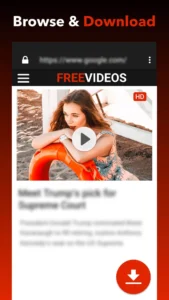
The app includes a built-in browser that automatically detects media on the pages you visit. When you find a clip you want, you can initiate the transfer with a single click. The tool supports a wide range of formats, including MP4, MP3, M4A, AVI, and even documents like PDF and TXT. You can find more tools like this at our whats download resource center. Because it manages multiple tasks simultaneously, you can keep your device organized without needing to switch between different applications. Whether you need to save a quick video or a large file, this utility is designed to handle the process in a quick and simple way.
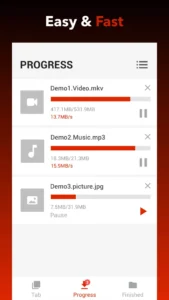
Managing your library is simple thanks to the integrated download manager. This feature lets you pause, resume, and remove files as needed, even if the internet connection is interrupted during the process. You can also download content in the background while you continue using other apps on your phone. For those concerned about privacy, the app allows you to store your saved items in a password-protected folder. If you are interested in other media tools, YouTube Go: Discontinued provides a historical look at how different apps handle offline playback. This Video Downloader – Downloader makes it easy to organize your favorite digital content.
Key Features for Media Management
- Auto-Detection: The browser identifies downloadable content automatically, saving you time searching for links.
- Format Versatility: It supports many common file types, including high-definition video and various document formats like doc, xls, and txt.
- Background Processing: Continue your work or browsing while your files finish saving in the background.
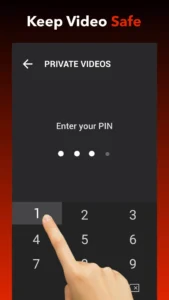
- Secure Storage: Keep your private files hidden away in a folder that requires a password to access.
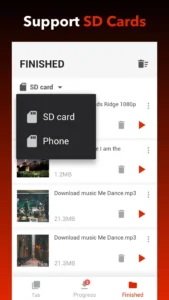
- SD Card Support: If your device has limited internal space, you can choose to save your files directly to an SD card.
- Multi-Tasking: Download several files at the same time to manage your media collection with high speed.
- Built-in Player: Preview your videos directly within the app to ensure you have the right file.
The application requires several permissions to function correctly. It needs access to network states and the internet to reach the websites you browse. It also requests write access to your external storage to save the files you collect. Other permissions, such as wake locks and foreground services, ensure that your downloads do not stop prematurely. For a different type of viewing experience, you could explore Pure Tuber: YouTube Client for its specific playback features. The Video Downloader – Downloader is free to use, though it includes advertisements to support its development.
Strengths and Limitations
Strengths:
- Fast download speeds with support for large files.
- Ability to play saved media offline using the built-in player.
- User-friendly interface that requires no advanced technical knowledge.
- Ability to bookmark favorite websites for quick access.
Limitations:
- The app is supported by advertisements.
- Requires multiple permissions to manage storage and network connectivity.
Frequently Asked Questions
Is Video Downloader – Downloader free to use?
Yes, the app is free to download and use, though it is supported by ads.
Does it work offline?
Once you have downloaded your videos or music, you can play them offline using the app’s built-in player.
Which Android version is required?
You need a device running Android 7.0 or higher to install and run this application.
Can I resume interrupted downloads?
Yes, the download manager includes functionality to pause and resume failed or interrupted tasks.
