


Google Analytics 4.15.1013121531
Google LLC
November 22, 2026
39.6 MB
4.15.1013121531
com.google.android.apps.giant
RELATED APPS






SCREENSHOTS
DESCRIPTION
Setting Up Your Mobile Data Tracking
Getting started with the Google Analytics APK is a simple process for anyone managing digital performance. Once installed, the app connects directly to your existing account, allowing you to monitor key customer interactions without needing to sit at a desk. Because it is designed for mobile efficiency, the setup focuses on giving you immediate access to your most important metrics right after you log in. Using the Google Analytics APK provides a direct line to your business pulse, making it easier to stay informed throughout the day. You simply download the package, sign in with your credentials, and your existing dashboards become available for instant mobile viewing.
The app requires several permissions to function correctly on your device. It uses internet access and network state monitoring to pull live data from your accounts. It also requests notification permissions to keep you updated, while wake locks and boot completion permissions ensure the app can handle background tasks and alerts reliably. The Google Analytics APK also uses your advertising ID and package size data to ensure the reporting remains accurate and relevant to your specific installation. These permissions allow the software to maintain a constant, secure bridge to your cloud-based data, ensuring that your mobile reporting mirrors the accuracy of your desktop interface.
Core Features for Business Intelligence
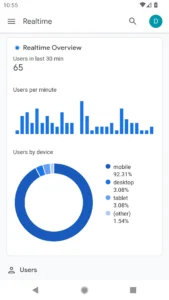
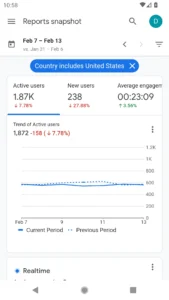
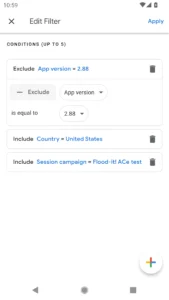
Google Analytics helps you maintain a clear view of how users navigate your digital channels. You can monitor real-time data, which is essential for understanding immediate spikes in traffic or user engagement. The built-in reporting tools allow you to compare different date ranges and apply specific filters to narrow down your focus. By providing these essential tools in a mobile-friendly format, the app ensures that you never miss a critical change in your website or application performance while you are traveling or working away from your office.
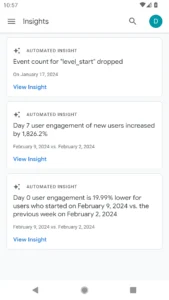
One of the primary benefits of this tool is the use of AI-generated insights. These automated patterns help you identify trends that might otherwise go unnoticed. You can also build your own custom reports by combining various metrics and dimensions, which can then be saved directly to your dashboard for quick future reference. For those managing inventory and sales alongside web data, you might also find Kyte: POS, Online Store & Catalog useful for your daily operations.
Managing Your Performance Metrics
Collaboration is a key part of the experience. You can analyze trends and share your findings with your team directly from your phone. By integrating with Google’s advertising ecosystem, the app allows you to optimize your campaigns while you are away from your primary workstation. If you are also tracking financial health, you could consider using Cash Book- daily expenses to keep your business books balanced while you track your web traffic. The ability to share these insights ensures your entire team stays aligned on marketing goals, regardless of their physical location.
Detailed Functionality Breakdown
- Check key metrics in built-in reports to understand performance.
- Monitor real-time data to see current user activity as it happens.
- Compare date ranges and apply filters for deeper analysis of trends.
- Build your own reports with any combination of metrics and dimensions.
- Save any reports to your dashboard for easy future access.
- Receive intelligent, AI-generated insights about your website or app data.
Quick Facts
Strengths and Limitations
- Real-time monitoring of website and app traffic.
- AI-driven insights to help identify data patterns.
- Ability to build and save custom reports for quick access.
- Requires a Google account for data synchronization.
- Does not work without an active internet connection.
- Permission requirements include access to network state and notifications.
Common Questions
Is Google Analytics free to use?
Yes, the app is free to download and use for monitoring your account data.
Can I see data while offline?
The app requires an active internet connection to pull the latest reports and real-time statistics.
Who should use this app?
It is best suited for website owners, app developers, and marketing professionals who need to keep an eye on performance metrics while away from their computers.
