


Hide Pictures & Videos - FotoX 13.2
Glad Appvestor
November 22, 2026
48.2 MB
13.2
com.smsrobot.photox
RELATED APPS






SCREENSHOTS


DESCRIPTION
Protect Your Personal Media with Hide Pictures & Videos – FotoX APK
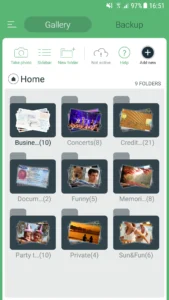
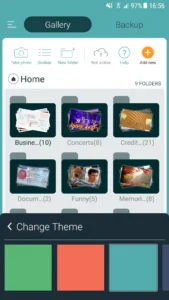
If you worry about someone scrolling through your phone and finding private images, you need a dedicated solution. Hide Pictures & Videos – FotoX is a vault app designed to keep your sensitive media away from prying eyes. Developed by Glad Appvestor, this tool provides a secure environment to store your photos and videos, ensuring that only you have access to your private gallery. With over 10 million installs, it is a popular choice for those seeking extra privacy on their mobile devices.
The app addresses the risk of unauthorized access by creating a protected vault. You can move your images into this space, where they are shielded by a PIN or pattern lock. If you are looking for other ways to manage your files, you might consider ZArchiver Pro Donate for advanced compression needs. Hide Pictures & Videos – FotoX also includes a unique feature that mimics a fake crash dialog, which can help mask the app’s true function if someone else opens it. This adds an element of deception to keep your private content hidden from curious users.
Key Security and Privacy Features
The app offers several layers of protection to ensure your data stays private. A standout feature is the break-in attempt record, which captures activity whenever someone enters the wrong PIN or pattern. For users who need to manage large collections, the app simplifies the process of hiding and organizing your media. You may also like exploring Minecraft Java: PojavLauncher to expand your device’s capabilities and gaming options.
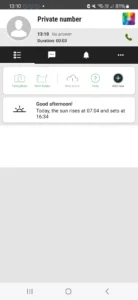
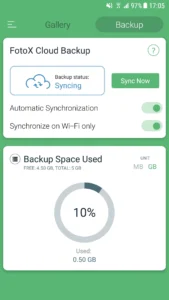
Hide Pictures & Videos – FotoX provides cloud backup options for premium users, allowing you to sync your vault across multiple devices. The after-call feature is particularly useful for quickly accessing or sharing photos immediately after a conversation ends. Additionally, you can activate the prevent uninstall option, which requires device administrator permissions to ensure no one can remove the app without your authorization. This combination of tools makes it a comprehensive choice for managing sensitive gallery content.
Getting Started and Permissions
To start, download the Hide Pictures & Videos – FotoX APK and install it on your device. Upon launch, you will set up your primary security method, such as a PIN or pattern. The app requests several permissions to function correctly, including camera access for capturing break-in attempts, storage permissions to manage your files, and foreground service permissions for background tasks. It also uses device administrator status to prevent unauthorized uninstallation. Because the app supports various features like after-call photo management, it also requests permissions related to phone calls and notification management.
Strengths and Limitations
Strengths:
- Effective vault system for hiding private media.
- Records break-in attempts with wrong PIN/pattern entries.
- Fake crash dialog provides an extra layer of privacy.
- Optional cloud backup for data synchronization between devices.
- Advanced security options to prevent unauthorized uninstallation.
Limitations:
- The app is supported by ads.
- Requires several sensitive permissions for full functionality, including device administrator access.
- Some advanced features, such as cloud storage, require a premium subscription.
Frequently Asked Questions
Is Hide Pictures & Videos – FotoX free?
Yes, the app is free to download and use, though it is supported by advertisements and offers optional premium features like cloud storage.
Does it work offline?
Yes, the core vault functionality for storing pictures and videos works offline. An internet connection is primarily used for cloud features and ad delivery.
How do I recover my password if I forget it?
The app includes a built-in password recovery process that allows you to reset your existing PIN or pattern and regain access to your vault.
Which Android version is required?
The app is designed for modern Android devices, though specific minimum version requirements are not listed in the current data.
