


RELATED APPS






SCREENSHOTS




DESCRIPTION
If you want to replace your standard mobile web reader, installing Opera: Browser with VPN and AI gives you an all-in-one browsing tool developed by Opera. The application packs a built-in VPN, ad blocker, AI assistant, and smart file manager into a single app. Grabbing the Opera: Browser with VPN and AI APK allows you to customize your online experience without downloading extra extensions.
Installing and Configuring Opera: Browser with VPN and AI APK
Getting started with the browser is simple. Once you complete the Opera: Browser with VPN and AI download and install the file, launch the app to complete the initial setup. You can choose your preferred search engine, select a visual theme, and enable Night Mode to dim the screen for late-night reading. If you want cross-device sync, sign into an Opera Account to keep your history and bookmarks synchronized across mobile and desktop devices.
During setup or standard web use, the application requests specific Android permissions:
- Location Access: Used for site location features when using map tools or reading local content.
- Camera and Audio Access: Needed if you capture photos directly inside the browser or interact with voice features and AI chat tools.
- Storage and Foreground Services: Allows the downloader to manage background transfers, auto-resume interrupted files, and save complete pages as PDFs for offline reading.
- Notifications: Sends updates on download progress, sports alerts, and live score changes.
Core Features for Privacy and Convenience
If you need a fast secure mobile browser, Opera offers multiple privacy settings and features built directly into the app:
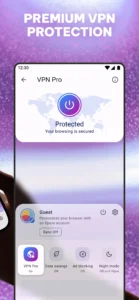
- Built-in Free VPN: Encrypts your internet connection without requiring a paid subscription or account login. You can select from three virtual locations to keep your personal details hidden.
- Integrated AI Assistant and Image Generator: Chat with the native AI to answer questions, summarize long articles, or generate custom visuals from text descriptions.
- Smart Downloader and Offline Pages: Automatically grabs videos or music when available, resumes downloads after connection drops, and lets you save web pages for signal-free reading.
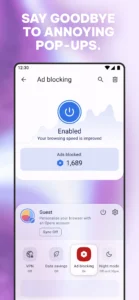
- Ad Blocker and Data Savings: Blocks intrusive pop-ups and ads while compressing page files to speed up browsing on slow networks.
- Flow File Sharing: Instantly share notes, web links, and media files between your phone and computer.
When searching for reliable Android options, users frequently compare features with Google Chrome: Fast & Secure to balance built-in privacy tools against alternative search environments.
Browser Information and Specifications
Strengths and Limitations
Strengths
- Free built-in VPN with three virtual locations and no required sign-in.
- Native AI chat and image generation without needing third-party extensions.
- Data savings compression and ad blocking to load pages faster.
- Options to save full pages or export web pages directly to PDF format.
Limitations
- Contains ad support within the free app tier.
- Substantial storage footprint with a file size of 212.4 MB.
- Requests numerous device permissions for full functionality.
For individuals who require heavy team chat or independent file distribution alongside their browser setup, apps like Telegram work well to cover direct communication needs on mobile devices.
Who Should Install and Who Should Skip
If you install the Opera: Browser with VPN and AI APK, you get immediate access to built-in privacy protection, data savings, and AI generation without searching for browser add-ons. It is well-suited for users who travel often or browse on weak cellular connections.
You should skip it if you prefer a minimal browser that uses minimal storage space, or if you want an app completely free of advertising models.
Frequently Asked Questions
Is Opera free to use on Android?
Yes, the app is free to install and use. Built-in functions like the free VPN, ad blocker, and AI tools are included, supported by ads within the browser.
Do I need an account to use the built-in VPN?
No account, login, or subscription is required to activate the built-in free VPN. You can toggle it on directly within your browser settings.
How do offline pages work in Opera?
You can save any active web page to your Offline Pages folder or use the Save as PDF function. These files remain accessible even when your mobile device has no internet connection.
What updates are in the latest release?
When updating to the Opera: Browser with VPN and AI latest version, you receive Chromium 156 integration, new custom system font settings, live score improvements, and a rolling visual design refresh.
APP TRAILER
