

Video to MP3 - Video to Audio 2.2.7.1
InShot Inc.
November 22, 2026
26.2 MB
2.2.7.1
mp3videoconverter.videotomp3.videotomp3converter
RELATED APPS





SCREENSHOTS
DESCRIPTION
Convert Media Files Quickly with Video to MP3 – Video to Audio APK
Extracting audio from your favorite clips should not be a complex task. If you want to turn video files into songs or create custom ringtones, Video to MP3 – Video to Audio provides a direct solution. This application, developed by Google Commerce Ltd, simplifies the process of converting formats and editing media on your smartphone.
The core function of this tool is to help you handle various media tasks without needing a computer. You can process up to 15 videos at once, saving significant time when you have a large library to manage. While many users look for offline tools like YouTube Go: Discontinued to manage content, this app focuses specifically on format conversion and editing. With over 50 million installs, it is a popular choice for mobile users who need a reliable media converter.
Key Features of the App
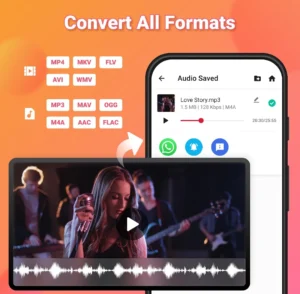
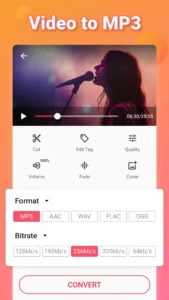
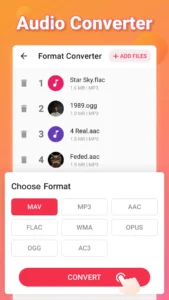
Video to MP3 – Video to Audio comes packed with features designed to handle audio and video files. You can convert video files like MOV, MKV, FLV, AVI, and WMV into audio formats including MP3, AAC, and M4A. Beyond simple conversion, the app allows you to adjust the bitrate from 32kb/s up to 320kb/s to balance file size and sound quality. This gives you full control over your final audio output.
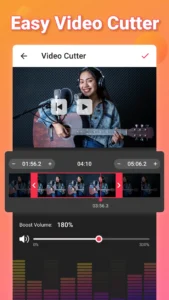
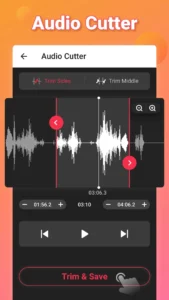
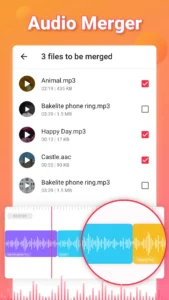
The app also functions as an advanced editor. You can trim video clips, cut audio segments, and merge multiple music files together. If your source audio is quiet, the built-in sound boost feature helps increase the volume. Users can also edit metadata tags, such as the title, album, and artist name, to keep their music library organized. You can even add music covers to your files, ensuring your collection looks professional in any music player app.
Getting Started and Permissions
To begin, simply download and install the Video to MP3 – Video to Audio APK. The app requires several permissions to function, including access to your media files so it can read and write video and audio content. It uses network state and internet permissions to display advertisements, as the app is free to use. Other permissions, such as vibration and wake lock, ensure the conversion process continues in the background without being interrupted by your phone’s power-saving modes.
If you prefer a different experience for managing video playback, you might explore tools like Pure Tuber: YouTube Client. However, for dedicated format conversion, this app remains a highly functional choice for your Android device.
Quick Facts
Strengths and Limitations
Strengths:
- Supports batch conversion for up to 15 videos at once.
- Offers various audio output formats including MP3, AAC, and FLAC.
- Includes built-in video and audio cutting tools.
- Allows users to set converted clips as ringtones or alarm sounds.
- Supports fade-in and fade-out effects for audio files.
Limitations:
- The app is supported by advertisements.
- Requires several storage and system permissions to operate.
- Needs internet access to display ads during use.
Who Should Install This App
This tool is ideal for users who frequently need to extract audio from videos or create custom ringtones for their devices. It is also useful for anyone needing to convert video formats like MKV or MOV into more compatible files. If you rarely edit media, you might find the permission requirements unnecessary for your needs. However, for power users looking for a versatile media converter, this app offers a comprehensive suite of tools in a single package.
Frequently Asked Questions
Is Video to MP3 – Video to Audio free?
Yes, the app is free to use, though it is supported by advertisements.
Can I convert multiple files at once?
Yes, the app supports batch conversion for up to 15 videos simultaneously.
Does it work offline?
The conversion features work with your local files, though internet access is used for displaying ads.
Which audio formats are supported?
The app supports a wide range of formats including MP3, wav, ogg, m4a, acc, and flac.
