


RELATED APPS




SCREENSHOTS





DESCRIPTION
Getting Started with Lightroom Photo Editor & Video APK
Installing Lightroom Photo Editor & Video is a manageable process to bring professional-grade editing tools to your smartphone. Once you download the Lightroom Photo Editor & Video APK, ensure your device runs Android 8.0 or higher. Upon launch, the app requests several permissions to function correctly. It requires access to your camera, media files, and location to help organize your shots. It also uses identity and account management permissions to sync your work, alongside connectivity permissions to check for updates and cloud features. You should be aware that the app also uses biometric sensors for security and requires background services for data synchronization.
This powerful mobile suite allows you to manage your photography workflow directly from the home tab. If you are looking for the right apk to handle high-resolution images, this application is a top choice. The interface is designed to be accessible, meaning you can start editing immediately without needing prior professional experience. The app also allows you to start edits or pick up where you left off using the dedicated Home tab. Whether you are a casual user or someone who spends hours curating a social media feed, the layout stays clean and simple.
Transform Your Images with AI Tools
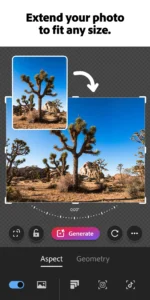
The core strength of Lightroom Photo Editor & Video lies in its collection of AI-powered features. You can use the Generative Remove tool to erase unwanted objects from your frames automatically. If you want to achieve a professional look, the Background Blur feature creates depth by softening elements behind your subject. For those who want quick results, the Quick Actions and Adaptive Presets suggest the best adjustments for your specific image, saving you time during the editing process. You can even use the new AI Assistant to describe your edits and let the software handle the technical adjustments.
- Generative Remove: AI-powered object removal for cleaner shots.
- Adaptive Presets: One-tap enhancements configured to your photo content.
- Background Blur: Add professional depth and bokeh effects to portraits.
- Film Filter Presets: Access 10 new glow effects and vintage styles.
- Video Editing: Apply color grading and light adjustments to your clips.
Beyond basic adjustments, the app offers advanced color grading and hue controls. You can apply film filter presets to give your photos a unique aesthetic or use batch editing to keep a consistent look across an entire set of images. If you are also interested in mobile videography, you might want to try InShot: Video Editor & Maker to refine your short-form clips. The app also supports video editing, allowing you to bring the same creative energy to your motion clips as you do to your still photos.
Quick Facts and Compatibility
Strengths and Limitations
The app provides a high level of creative control, making it suitable for both casual users and serious photographers. Many users find the AI suggestions helpful for learning how to improve their shots. If you prefer a different approach to capturing your photos, you may also consider checking out GCam: Google Camera to see how different processing styles handle light and shadows. The latest update also improved the Blemish Removal tool, which helps you achieve clear skin much faster than before.
- Large file size of 260.7 MB requires significant storage space.
- Extensive permission list including location and account management.
- Some advanced features may require in-app purchases.
- Requires a stable connection for cloud syncing and AI features.
Frequently Asked Questions
Is Lightroom Photo Editor & Video free?
Yes, the app is free to download and provides access to many editing tools.
Does it work on older Android versions?
You need at least Android 8.0 or higher to install and run the latest version of the application.
Can I edit photos offline?
The application allows for local editing of photos stored on your device, though some features may require an internet connection to sync or access cloud-based tools.
