

MirrorGo - Mirror Android scre 1.0.0.116
November 26, 2026
4.8 MB
1.0.0.116
Android 5.0
com.wondershare.mirrorgodf
RELATED APPS
SCREENSHOTS
DESCRIPTION
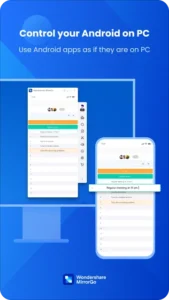
MirrorGo – Mirror Android scre is a specialized utility developed by Shenzhen Wondershare Software Co., Ltd. that bridges the gap between your mobile device and your computer. By installing the MirrorGo – Mirror Android scre APK, you can cast your phone screen directly to a PC, enabling you to manage mobile tasks, view content, and handle entertainment from a much larger display. This utility is designed for users who want to bring their mobile experience to a desktop environment for better visibility and control.
How to set up MirrorGo – Mirror Android scre APK
To begin using this software, you must install the application on your Android device and pair it with the corresponding desktop program. This connection allows you to exert full control over your smartphone using your PC mouse and keyboard. You can find the apk latest version for your device to ensure maximum compatibility with your current operating system. Please ensure both your phone and PC are on the same network for the best experience, as the software relies on stable connectivity to function effectively.
The app requests several permissions to function properly, including access to your Wi-Fi and network state to maintain a stable link. It also requires system overlay and window permissions to display content, as well as storage access for file transfers and saving media. Additionally, the app uses foreground services and wake locks to keep the connection active during your sessions. These permissions allow the software to maintain a constant bridge between your two devices without unexpected interruptions.
Core features and functionality
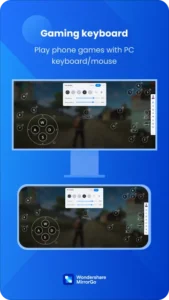
Once connected, you can mirror your phone screen to your PC with a single click. This feature is useful for viewing mobile apps on a larger monitor. If you are a mobile gamer, you can use the gaming keyboard feature to map on-screen controls to your PC keyboard and mouse, effectively turning your mobile titles into PC-style experiences. This transformation makes playing complex games much easier for many users who prefer traditional mouse and keyboard input over touch controls.
- One-click screen casting to your PC monitor.
- Custom gaming key mapping for mouse and keyboard support.
- Real-time message popups on your computer screen.
- Drag-and-drop file transfers between phone and PC.
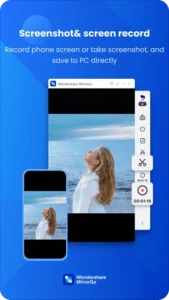
- Automatic saving of screenshots and screen recordings.
Beyond gaming, the app facilitates productivity by syncing your phone data with your computer. You can enable message popups on your PC to stay updated with your notifications without picking up your device. For those who manage files frequently, the drag-and-drop interface makes transferring data between your phone and PC simple. You can also capture screenshots or record your screen activity, with all files automatically saved to your computer.
If you need to manage your mobile files during this process, tools like ZArchiver Pro Donate can help organize your internal storage. For users interested in running Java-based software on their mobile devices, you might also look at Minecraft Java: PojavLauncher to expand your app library. These utilities complement the mirroring experience by providing extra file management and software compatibility layers.
Strengths and limitations
- Provides easy screen mirroring and PC control.
- Supports custom key mapping for mobile games.
- Allows file transfers via drag and drop.
- Requires a companion desktop program to work.
- Needs multiple system permissions to operate.
Frequently asked questions
Is MirrorGo free to use?
Yes, the app is free to install and use for mirroring and controlling your Android device from a PC.
Does this app work offline?
The mirroring process relies on a network connection, specifically Wi-Fi, to link your phone and PC effectively.
Which Android version is required?
You need to be running Android 5.0 or higher to install and run the application.
