


RELATED APPS




SCREENSHOTS
DESCRIPTION
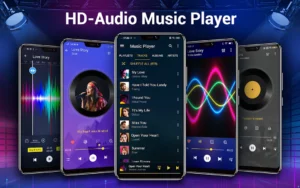
Installing Music player- bass boost,music on your Android mobile device provides a complete system for managing offline audio tracks and customizing sound output. Developed by Mobile_V5, this utility scans your internal storage to organize local songs while giving you direct control over equalizer frequencies. If you want to enhance sound clarity and boost low-end frequencies, downloading the Music player- bass boost,music APK delivers a practical solution for playing local audio files.
Setting Up Music player- bass boost,music APK
Setting up the Music player- bass boost,music APK begins by making sure your phone meets the minimum system requirements. The application has a file size of 31.4 MB and requires Android 6.0 or higher. Once installed, the setup process involves configuring several permissions to ensure smooth media management across your phone.
To scan and index your local audio files, the app requests storage access through READ_EXTERNAL_STORAGE and READ_MEDIA_AUDIO permissions. If you intend to play music while using other applications, FOREGROUND_SERVICE and FOREGROUND_SERVICE_MEDIA_PLAYBACK allow playback to continue without interruption. For wireless audio equipment, BLUETOOTH and BLUETOOTH_CONNECT permissions manage device connections.
The app also utilizes SYSTEM_ALERT_WINDOW to display floating player controls over other screens, while REQUEST_IGNORE_BATTERY_OPTIMIZATIONS keeps your audio playing smoothly during low-power modes. If you frequently download tools from a play store app, checking these operational permissions before setup ensures all background features work correctly on your device.
Audio Control Features and Sound Customization
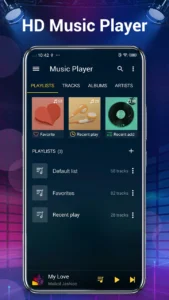
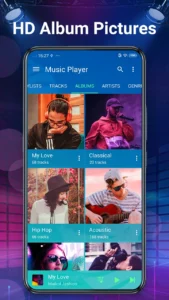
After completing setup, the application automatically categorizes your local audio library into artists, albums, genres, custom playlists, and system folder structures. If you need a streaming alternative alongside your local music library, you can check Meulify for online listening options. For local audio playback, this app runs entirely on your device hardware without requiring an active network connection.
Core audio management features include:
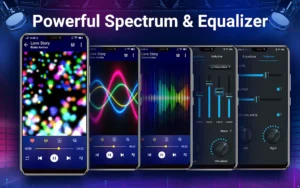
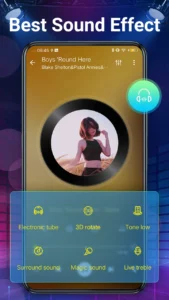
- Tone Presets: Access over 22 built-in tone styles including Rock, Pop, Jazz, Heavy, Classic, Folk, and Hip Hop, or adjust multi-band frequency controls manually.
- Bass Amplification: Boost low frequencies using a dedicated bass amplifier and virtualizer controls designed for headphones and external speakers.
- Lyric Synchronization: Automatically scan and match lyric files to display text synchronously during track playback.
- Widget Customization: Place customizable widgets on your home screen to skip tracks, pause playback, and adjust volume levels quickly.
- Metadata and Queue Management: Edit artist names, re-title album tracks, organize play queues, and set a sleep timer to stop playback automatically.
For users who want hardware-level control over individual app volume levels, Sound Assistant can offer complementary audio routing capabilities across your phone.
Quick Facts for Music player- bass boost,music
Strengths and Limitations
Strengths:
- Offers over 22 equalizer tone presets alongside manual frequency adjustment.
- Supports automatic scanning and matching for display lyric files.
- Provides customizable home screen widgets for fast audio playback control.
- Ignores leading articles when sorting track titles and artist names.
Limitations:
- Displays advertisements during operation in the free model.
- Requires multiple system permissions to enable background playback and floating controls.
- Does not offer online audio streaming capabilities.
Who Should Install and Who Should Skip
You should install this app if you store MP3 files locally and want an offline audio equalizer with bass boost features. Users who value home screen widgets, ringtone customization, and lyric matching will also benefit from its toolset. Getting the Music player- bass boost,music download allows you to customize track tone without creating an online account.
You should skip this software if you rely solely on online streaming services or prefer an ad-free interface without managing local files.
Frequently Asked Questions
Is Music player- bass boost,music free to install?
Yes, the application is free to download. It includes ad support alongside optional in-app billing features.
What Android version is required?
You need a mobile device running Android 6.0 or higher to install Music player- bass boost,music for Android.
Does the app work without internet?
Yes, the app processes offline audio files saved on internal storage or external SD memory without requiring an internet connection.
What is included in the Music player- bass boost,music latest version?
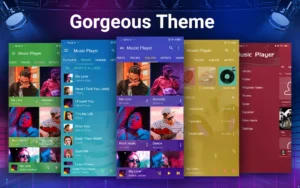
The Music player- bass boost,music latest version (v6.3.2) improves track sorting, upgrades ringtone settings, revamps widget customization, and optimizes overall UI visuals.
